- Baby Bottles
- Batter
- Eggs
- Flour
- Milk
- Sugar
- Wheat
- You can only receive the party favors (Baby Bottles, Batter, Eggs, Flour, Milk, Sugar, and Wheat) and the baby Highland Cow once.
- You are limited to one Birthday Cake per farm.
GPT Loader -->
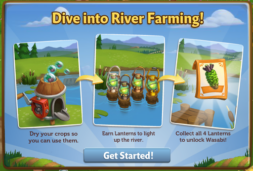
Using the Lantern:
The Lantern feature has four stages. Each stage requires a
certain amount of Crops dried. When you dry your Water Crops, they will fill
your Lantern bar. Each time you fill the bar, you will win a lantern that you
can place in the water.
To see your bar, click on the Lantern to open
the main menu. Your bar is located on the bottom of this screen. The number at
the bottom of the bar indicates how many Crops you need to dry and your current
progress towards this goal.
As you complete each stage you will unlock a new River
Lantern. The stages and respective Lanterns are as follows:
Once you have dried enough Water Crops, you will be able to
harvest your Clipboard by clicking on it.
The more Water Crops you dry, the faster you fill your bar.
In addition, drying Water Crop Packets like Lotus counts twice!
If you do not want to wait to fill the Lantern bar, you can
use Farm Bucks to skip these steps and get the next River Lantern right
away!
Wasabi Crop Packet:
Once you have earned all four of your River
Lanterns, you can claim your Wasabi Crop Packet! The Wasabi is
used in high value recipes in the Crafting Kitchen and Prized Wasabi are worth
more points at the County Fair. Click the “Share and Go To Market” button to purchase your
first Seeds for Coins.
Additional Information:
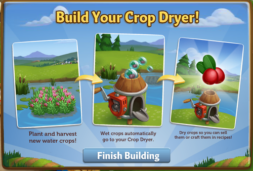
Introducing, the Crop Dryer!
Use this new building to dry your Water Crops to sell or use in crafting
Recipes!
When you unlock the Appaloosa
River Expansion to the right of Camarillo Country, you will reveal the Crop
Dryer.
At first, it will look like a small pile of boxes. Click on it, and
then you will see the following pop-up. Click on the “Finish Building” button
to get started.
Building the Crop Dryer:
Your first step is collecting construction parts. You will need the following
items to start building your Crop Dryer:
To collect Fan Blades, click
on the “Post” button to post to your Facebook wall – you will get the parts
when your friends click on it, or when you click on a similar newsfeed post.
Click on the “Ask” button to
send requests for Fan Engines and Door Hinges to your Neighbors. If you do not
wish to wait for your friends, you can skip any of these tasks for Farm Bucks.
Note: You can send a request for materials to your Friends
every 18 hours.
Once you have collected the required items, click on the “Start Building”
button at the bottom of the construction Menu.
Now that the Crop Dryer is
almost complete, you will need a little help from your Neighbors to finish the
job. The Crop Dryer requires four additional helpers, so click on the “Ask
Friends” button to send some crew requests to your Friends. When they accept,
you will see the spots in the Build Menu begin to fill. If you do not wish to
wait for your friends, click the “Hire One” button to purchase crew members
with Farm Bucks.
Inside the Crop Dryer:
Click on the Crop Dryer to
open the main menu. This menu shows all of the Water Crops you currently have
available to sell and how much Fuel you have.
Fueling your Dryer:
Crop Drying is no easy task
without the help of some powerful fuel. In order to dry your Water Crops, you
will need to fill your Dryer with Fuel. Every time you use your Crop Dryer, it
will deduct from your fuel reserves. The amount of Fuel you have left can be
found at the bottom of the Dryer menu.
Out of Fuel? There are a few
different ways to get more:
You can obtain Fuel from
asking your Friends for help or purchasing it in the General Store.
Click on the “Ask” button to
send requests for Fuel to your Neighbors. If you do not wish to wait for your
friends, you can purchase Fuel in the General Store for Farm Bucks.
Using the Crop Dryer:
Once your menu is open, drying
Crops is easy. Clicking on an item will dry it and clicking on the green button (B.) will dry all of your
Water Crops with one click. Note: The Dry Max Possible will dry as many crops as your fuel supply will allow. The total
amount of Fuel you use will decrease from the bar (A.) at the bottom of the
Crop Dryer menu. Every time you click on a Crop, it (dried Crop) will be added
to your Inventory.
Crafting & Earning Coins!
Once you’re finished Crop
drying, it’s time to craft and earn some money! Your dried Water Crops and
finished products can be sold in your Market Stand for Coins. If you have any questions about how to use
the Crafting Kitchen and/or Market Stand, see our guides: Crafting Kitchen and Market Stand.
Additional Information:
Your first step is collecting construction parts. You will need the following items to start building your Horse Stable:
Once you have collected the required items, click on the “Start Building” button at the bottom of the construction Menu.
Just like the regular Shady Trough, the upgrade needs to be completed before you can enjoy an increased animal capacity.
Your Deluxe Shady Trough is now complete!
Additional Information:
New “Time to Try Some Thai” Limited items are
available in the General Store. Our little Hainan Pig produces 5 Fertilizer and
gives 28 XP! Check below for details on our latest release and be sure to share
what your favorite new addition is by commenting below this post!
New Limited Edition Items:
New Limited Edition Trees:
New Limited Edition Animals:
New Limited Edition Crop:
Crafting Kitchen Recipes:
Crafting Workshop Recipes:
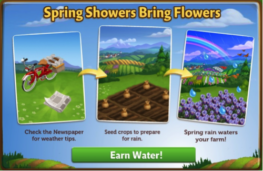
He is here to deliver you the Newspaper, which is filled
with all kinds of valuable information about how you can prepare for the coming
rain.
Click on the Newspaper to open it up and you will see what
tasks you have to complete to get ready.
This menu also explains in a bit more detail what some of
the benefits are of this feature. If you complete the Spring Showers tasks (see
below section for more detail), not only will you earn 30 free water, but any
Limited Edition Crops, Trees or Animals on your farm will have a higher output
than normal.
Spring Showers Tasks:
To prepare, you will need to feed some of your Adult Goats (they get
very frightened by storms, but a full belly will help keep them calm), collect
Copper Rain Buckets and Plush Blue Towels.
To collect Rain Buckets, click on the blue “post” button to
post a feed to your wall that your friends can click on to fulfill your
request. To collect Plush Towels, click on the “ask friends” button, which will
open up a menu that will allow you to send requests to individual friends for
assistance.
And finally, you will need to feed your goats. If you do not
have any goats, they can be purchased from the General Store for Coins or Farm
Bucks.
If you do not wish to wait for your friends, you can skip any
of these tasks for Farm Bucks.
Note: You can
send a request for items to your Friends every 18 hours.
Once you have completed all three tasks, it’s going to start
raining on your farm! Any seeded crops (up to 30) will be automatically watered
for you, so make sure to plan accordingly.
Note: Trees will
not be automatically watered.
If you activate your rain and you have no crops that need
watering, the extra drops will be added to your HUD, so nothing is lost.
After the rain has subsided, make sure to refresh your game
for a surprise! Springtime in FarmVille 2 means more than just watered crops;
your Farm has come to life with beautiful flowers, butterflies, and Rainbows!
Unfortunately, all good things must come to an end, including
springtime. Mouse-over the Newspaper to view the countdown timer that indicates
how long you have until spring is over. Be sure to take advantage of the rainy
season by planting Limited Edition Crops and stocking up on LE Animals, as they
will give you more resources than normal on a springtime farm.
Once your
timer has been depleted, you will be able to complete a new set of tasks to
bring the rain back to your Farm.
Additional
Information:
We hope you all enjoy watching the rain fall and getting even
more resources from your Limited Edition Crops, Trees and Animals.
Hey
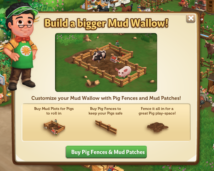
Farmers! Did you know that you can customize your Mud Wallow with
special Pig Fences and Mud Patches? They are available now in the
“Decorations” section of the General Store.
Here is a look at one of the many ways you can build out your Mud Wallow:
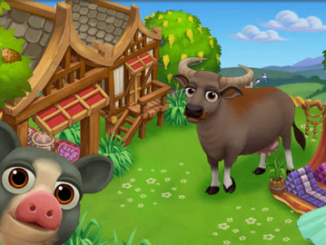
Our little Black Spotted Ossabaw Pig is having a ball rolling around in that mud!
Spring
has arrived in FarmVille 2, along with new Limited Edition items!
The Ossabaw Island Hog is known to be small, but what it lacks in size
it makes up for in cuteness, just like the one pictured above. Check out
the information below for more details about our latest release and be
sure to let us know which addition is your favorite!
New Limited Edition items:
New Limited Edition Trees:
New Limited Edition Animals:
New Limited Edition Crops:
New Crafting Kitchen Recipes:
Hey Farmers!
Vanilla is back for a limited time only! For four days only, use Vanilla to craft three special Recipes: Vanilla Cream, Vanilla Butterscotch Filling and Vanilla Butterscotch Bundt.
All of these Recipes yield a hefty profit, so hurry on into the Crafting Kitchen to whip up some of these delicious treats before they disappear!
Hey Farmers,
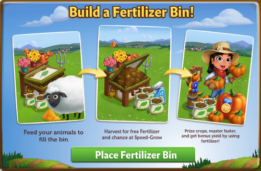
Do you need more Fertilizer? If so, the new Fertilizer Bin
is for you! Feed your animals to fill the Bin and then harvest it to earn free
Fertilizer for your crops. If that wasn’t enough, you also have a chance of
earning Speed-Grow when you collect from your Fertilizer Bin, so head on over
to FarmVille 2 and start building today!
If you are level 8 or higher, you will see the following
pop-up. Click on “Place Fertilizer Bin” to get started.
Building the Fertilizer Bin
Your first step is collecting construction parts. You will need the
following items to start building your Fertilizer Bin:
For the Green Paint, click on the “Post” button to post to
your Facebook wall – you will get the parts when your friends click on it, or
when you click on a similar newsfeed post.
To collect Grass Clippings and Wood Planks, click on the
“Ask” button to send requests for the items to your Neighbors.
You can also purchase any of these items above for Farm Bucks
if you do not wish to wait for your friends to respond to your requests or newsfeed
posts.
Note: You can post a request for Green Paint to your
newsfeed every 16 hours and send requests for Grass Clippings and Wood Planks to
your Friends every 18 hours.
Once you have collected the required items, click on the “Start Building!”
button at the bottom of the construction Menu.
Now that the Fertilizer Bin is almost complete, you will
need a little help from your Neighbors to finish the job. The Fertilizer Bin
requires 4 additional mechanics, so click on the “Ask Friends” button to send
some crew requests to your Friends. When they accept, you will see the spots in
the Build Menu begin to fill. If you do not wish to wait for your friends,
click the “Hire One” button to purchase crew members with Farm Bucks.
Once you have successfully filled all 4 spots, click on the
“Finish & Share” button.
Using the Fertilizer Bin
You must have at
least one Adult Animal on your farm that is not Prized for the Bin to be
functional. When you feed your Animals, they will fill your Fertilizer Bin
Meter with compost, which is a new type of material that can only be
used with this feature.
Collected
compost
will be automatically added to your Fertilizer Bin Meter. Once your
Meter is full, you can harvest the Bin with a Fertilizer Rake
(see below) for extra Fertilizer.
To see your Meter, click on the Fertilizer Bin to open the
main menu. Your Meter is located on the left-hand side of this screen. The
number at the bottom of the Meter indicates how much compost you need to
collect and your current progress towards this goal.
Additionally, you can also see your progress by hovering
your mouse over the Bin to display the green progress bar.
Fertilizer Rakes & Harvesting your Bin
Once you have
collected the necessary amount of compost, you will need one Fertilizer Rake to
harvest your bin. You can craft your Rake in the Workshop with two Pieces of
Wood. Click on the turquoise “Craft” button to head on into the Crafting
Workshop.
Once you are inside
the Crafting Workshop, you will need two “Piece of Wood” to craft the Rake.
Note: If you do
not want to craft a Fertilizer Rake, you can use Farm Bucks to skip these steps
and get it right away.
A cute butterfly
flying over the Bin will indicate it is full. Once you have crafted your
Fertilizer Rake, harvest your Bin by clicking on it. When you harvest your Bin,
you will always produce extra Fertilizer, which can be used on Crops &
Trees.
Note: Any extra
Fertilizer you produce will be automatically added to the Fertilizer total at
the top of the game screen.
In addition to Fertilizer, you have a chance of earning
Speed-Grow when you harvest your Bin!
Additional Information:
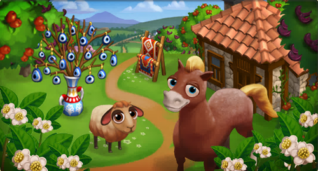
A
new set of Turkish Delights Limited Edition items have arrived in
FarmVille 2! Add the adorable Anadolu Pony to your collection or the Red
Karaman Sheep! Check out the information below for more details about
our latest release.
New Limited items:
New Limited Edition Trees:
New Limited Edition Animals:
New Limited Edition Crops:
New Crafting Kitchen Recipes:
| CastleVille: | ![]() |
| ChefVille: | ![]() |
| CityVille: | ![]() |
| CoasterVille: | ![]() |
| FarmVille 2: | ![]() |
| Hidden Chronicles: | ![]() |
| Ruby Blast: | ![]() |
| Zynga Slingo: | ![]() |
| The Ville: | ![]() |

| Zynga Bingo | CastleVille | ChefVille | CityVille | CoasterVille |
![]() | ![]() | ![]() | ![]() | ![]() |
| FarmVille 2 | Ruby Blast (leaderboards) | Zynga Slingo (leaderboards) | The Ville |
![]() | ![]() | ![]() | ![]() |

© 2026 FarmVille2Free.com – Fan site. Not affiliated with or endorsed by Zynga Inc. All trademarks belong to their respective owners.