Introducing, the Crop Dryer!
Use this new building to dry your Water Crops to sell or use in crafting
Recipes!
When you unlock the Appaloosa
River Expansion to the right of Camarillo Country, you will reveal the Crop
Dryer.
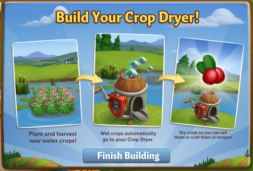
At first, it will look like a small pile of boxes. Click on it, and
then you will see the following pop-up. Click on the “Finish Building” button
to get started.

Building the Crop Dryer:
Your first step is collecting construction parts. You will need the following
items to start building your Crop Dryer:
- Fan Blades
- Fan Engines
- Door Hinges
To collect Fan Blades, click
on the “Post” button to post to your Facebook wall – you will get the parts
when your friends click on it, or when you click on a similar newsfeed post.
Click on the “Ask” button to
send requests for Fan Engines and Door Hinges to your Neighbors. If you do not
wish to wait for your friends, you can skip any of these tasks for Farm Bucks.
Note: You can send a request for materials to your Friends
every 18 hours.
Once you have collected the required items, click on the “Start Building”
button at the bottom of the construction Menu.
Now that the Crop Dryer is
almost complete, you will need a little help from your Neighbors to finish the
job. The Crop Dryer requires four additional helpers, so click on the “Ask
Friends” button to send some crew requests to your Friends. When they accept,
you will see the spots in the Build Menu begin to fill. If you do not wish to
wait for your friends, click the “Hire One” button to purchase crew members
with Farm Bucks.
Inside the Crop Dryer:
Click on the Crop Dryer to
open the main menu. This menu shows all of the Water Crops you currently have
available to sell and how much Fuel you have.
Fueling your Dryer:
Crop Drying is no easy task
without the help of some powerful fuel. In order to dry your Water Crops, you
will need to fill your Dryer with Fuel. Every time you use your Crop Dryer, it
will deduct from your fuel reserves. The amount of Fuel you have left can be
found at the bottom of the Dryer menu.
Out of Fuel? There are a few
different ways to get more:
- Ask your friends to send you Fuel
- Purchase Fuel Packs for Farm Bucks
- Give it some time— Fuel for your Crop Dryer
gradually replenishes itself after 1 hour.
You can obtain Fuel from
asking your Friends for help or purchasing it in the General Store.
Click on the “Ask” button to
send requests for Fuel to your Neighbors. If you do not wish to wait for your
friends, you can purchase Fuel in the General Store for Farm Bucks.
Using the Crop Dryer:
Once your menu is open, drying
Crops is easy. Clicking on an item will dry it and clicking on the green button (B.) will dry all of your
Water Crops with one click. Note: The Dry Max Possible will dry as many crops as your fuel supply will allow. The total
amount of Fuel you use will decrease from the bar (A.) at the bottom of the
Crop Dryer menu. Every time you click on a Crop, it (dried Crop) will be added
to your Inventory.
Crafting & Earning Coins!
Once you’re finished Crop
drying, it’s time to craft and earn some money! Your dried Water Crops and
finished products can be sold in your Market Stand for Coins. If you have any questions about how to use
the Crafting Kitchen and/or Market Stand, see our guides: Crafting Kitchen and Market Stand.
Additional Information:
- You are limited to one Crop Dryer per farm.
- You can only sell dried Water Crops and finished
products in your Market Stand.