Mastery Boosts!

21 December 2013 FarmMaster 0

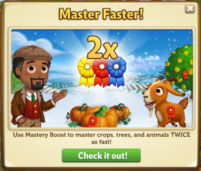
Master your Crops, Trees, and Animals faster with Mastery Boosts! Select from 1 Day, 3-Days, and 7-Days Mastery Boosts, which get you 2X the Mastery Points while the Boost is active!

  
If you are level 7 or higher, you will see the following pop-up. Click on the “Check it Out” button to get started.
  

You can select from three different Mastery Boosts. From the General Store, you can purchase a 1 Day, 3-Days, or 7-Days Mastery Boosts for Farm Bucks.
Mastery Boost - FarmVille 2
Using the Mastery Boosts:
Once you have purchased a Mastery Boost, you will receive a 2X Mastery Point Bonus when you harvest your Crops, Trees, and Animals for a limited time! A small ribbons icon above your Neighbor Bar will indicate the Bonus is active. Hover over this icon if you would like to see how much time you have remaining until it expires (see image below):
Mastery Boost - FarmVille 2
 
Additional Information: 
  • You can purchase as many Mastery Boosts as you wish, but you are limited to one active Boost at any given time.
  • You are unable to cancel a Mastery Boost once it has been activated.

Speed Boosts!

18 December 2013 FarmMaster 0

Farm faster with Speed Boosts! Choose from three different options, 24-Hours, 3-Days, and 7-Days, which all help your Avatar farm 3X faster while the Boost is active! 

If you are level 7 or higher, you will see the following pop-up. Click on the “Try Speed Boost” button to get your first Boost for free.

 
You can purchase a 1 Day, 3 Days, or 7 Days option and while active, your avatar will move at 3X the normal speed. All three Boosts are available in the General Store for Farm Bucks. Note: Your first Speed Boost is free.
  Speed Boosts - FarmVille 2
  
Using the Speed Boosts: 
After a Speed Boost has been purchased, a small running farmer icon above your Neighbor Bar will indicate the Bonus is active. Hover over this icon if you would like to see how much time you have remaining until it expires (see image below):
Speed Boost - FarmVille 2
 
Additional Information:
  • You can purchase as many Speed Boosts as you wish, but you are limited to one active Boost at any given time.
  • You are unable to cancel a Speed Boost once it has been activated.

The Holiday Book, Stage 3

17 December 2013 FarmMaster 0
The Holiday Book Feature is broken up into four consecutive stages that unlock over time. Click the links below to find out more information about each stage.
Stage 1 Guide: View
Stage 2 Guide: View
Stage 3 Guide: View
Stage 4 Guide: Coming Soon!
Oh boy! Marie found your old Family Holiday Book, which is all about decorating! Assist Marie with her tasks to earn beautiful Decoration Lights for buildings on your farm and other great rewards. Complete all four stages and get the exclusive baby Watermael Chicken!
Note: The Adult Watermael Chicken will produce 5x Fertilizer when fed!
  
Completing Your Rocking Chair (Holiday Book Quests):
In order to earn some great prizes, you will need to complete the Holiday Book Quests. Currently, only the first, second, and third set of quests is available. The final stage of this feature will unlock in the coming weeks. You can access the Quest Menu from clicking on the Rocking Chair. 
Holiday Book - Stage 3 - FarmVille 2


Each Holiday Book Quest has six parts that have to be completed. As you finish parts of your quest, a green check mark will appear to indicate what parts of the quest have been completed. If you complete all six parts of the Holiday Book, Stage 3 Quest, you will win Speed-grow, and Ribbons & Bows Decorations for a building on your farm!
Holiday Book - Stage 3 - FarmVille 2


Holiday Book Quests – Week 3:
As noted above, click on the Rocking Chair to start working on your third set of Holiday Book Quests. The Holiday Book, Stage 3 Quest tasks require you to make Ribbons in the Crafting Workshop, collect Bows from Teddy Bears, and get Hooks by completing quests for Gus and/or collect Hooks from your Newsfeed.
Surprise Decoration: Click on the “Post” button to post a request for a Surprise Decoration (one out of the six Decorations) to your Facebook wall; you will get a Surprise Decoration (one out of the six Decorations) when your Friends click on it, or when you click on a similar newsfeed post! Note: You can post a request using this button every four hours.
Holiday Book - Stage 1 - FarmVille 2 
The first step is to craft Red Holiday Ribbon, Yellow Holiday Ribbon, and Blue Holiday Ribbon. Click on the “Make” button to head into the Crafting Workshop to get started.
Holiday Book - Stage 3 - FarmVille 2


The next step in this quest is to collect Green Ribbons and Purple Ribbons from Teddy Bears. You can collect Green Ribbons as you craft Teddy Bears from the Teddy Bear Gift Exchange. You can collect Purple Ribbons as you earn the Teddy Bear Gift Exchange prizes. Note: If you do not wish to complete any of these tasks, you can skip this step for Farm Bucks.
To collect Green Candy Canes and Purple Ribbons, click on the “Collect” button to open the Teddy Bear Gift Exchange.
Holiday Book - Stage 3 - FarmVille 2
As you craft Teddy Bears, you can find Green Ribbons. If you find some, they will appear on your farm in a similar fashion to Prize Goods. 
Holiday Book - Stage 3 - FarmVille 2
  
As you earn the Teddy Gift Exchange prizes, you can find Purple Ribbons. If you find some, they will appear on your farm in a similar fashion to Prize Goods. 
Holiday Book - Stage 3 - FarmVille 2
Additionally, you can get Red Candy Canes and Green Candy Canes by collecting Friends’ and Neighbors’ requests from your Newsfeed.


The final step in this quest is to collect Hooks by completing quests for Gus. Click on the “Go To Quest” button to start Gus’s ‘Community Caring’ quests. Note: If you have completed Gus’s ‘Community Caring’ quests, you will need to complete Barbara’s ‘Winter Guests.’ If you do not wish to complete any of these quests, you can skip this step for Farm Bucks. Gus’s ‘Community Caring’ quests are as follows:
Holiday Book - Stage 1 - FarmVille 2
  Holiday Book - Stage 1 - FarmVille 2
Holiday Book - Stage 1 - FarmVille 2

Holiday Book - Stage 1 - FarmVille 2  

As you complete the quests for Gus, you will receive the following pop-up to indicate that you have earned Hooks:
The Holiday Book - Stage 1 - FarmVille 2
You can also get Hooks by collecting Friends’ and Neighbors’ requests from your Newsfeed (see image below):
The Holiday Book - Stage 1 - FarmVille 2
 
  
As you complete the Holiday book Quests, you will receive special rewards, such as Speed-grow! Click on the “Share” button to share Holiday Hooks with Friends.
Holiday Book - Stage 3 - FarmVille 2 
Holiday Ribbons and Bows: 
In order to earn the lovely Holiday Ribbons and Bows Decorations, you will need to complete the Holiday Book, Stage 3 Quests. As you complete each quest, various buildings on your farm will be decorated with the Ribbons and Bows! Below is a list of the buildings that you can decorate with the Ribbons and Bows:
  1. Crafting Workshop
  2. Feed Mill
  3. Hen House
Holiday Fences:
Have you completed the Holiday Book, Stage 3 Quests and are looking for something else to do while you wait for the following week? Complete the Holiday Book, Stage 3 Quests multiple times to earn Bonus Fences with Ribbons and Bows!
Holiday Book - Stage 3 - FarmVille 2
Each additional time you complete the Holiday Book, Stage 3 Quests, you will receive the following pop-up. Click on the “Place and Share” button to share some of the rewards with Friends!
  Holiday Book - Stage 3 - FarmVille 2
Note: You are not required to complete the Holiday Book, Stage 3 Quests multiple times in order to earn the exclusive baby Watermael Chicken. 
Additional Information: 
  • You have 35 days to collect the Holiday Book prizes and Decorations. If you do not collect them all, the prizes and the Decorations will disappear and you will be unable to claim them.
  • If you want to see how much time you have left to claim the Holiday Book prizes and the Decorations, hover your cursor over the Chair.
  • If you do not wish to use the Rocking Chair, it can be sold (frame only) or stored in your Inventory after 1/7/14. Note: You will only receive Snowflakes when the Rocking Chair is built and the Holiday Book Quests are active (You will not receive Snowflakes if the Rocking Chair is not fully constructed or if the Holiday Book Quests are not active).
  • You are not required to complete the Holiday Book, Stage 3 Quests multiple times in order to earn the exclusive baby Watermael Chicken. 
  • You are limited to one Rocking Chair per Farm. 

The Teddy Bear Gift Exchange!

17 December 2013 FarmMaster 0
The time has come for the Teddy Bear Gift Exchange! Crafting Teddy Bears in the Gift Exchange will earn you Tickets, which you can redeem for rewards and the exclusive baby Girgentana Goat! 

If you are level 12 or higher, you will see the following pop-up. Click on the “Start Building” button to get started.
Teddy Bear Gift Exchange - FarmVille 2
   
Building the Teddy Bear Gift Exchange:
Your first step is collecting Building Materials. You will need the following items to start building your Teddy Bear Gift Exchange. 
  • Crafting Baskets
  • Green Cloths
  • Red Wooden Planks
To collect Crafting Baskets, click on the “Post” button to post to your Facebook wall; you will get the parts when your Friends click on it, or when you click on a similar newsfeed post.
Click on the “Ask” button to send requests for Green Cloths and Red Wooden Planks to your Neighbors. If you do not wish to wait for your Friends, you can skip any of these tasks for Farm Bucks.
Teddy Bear Gift Exchange - FarmVille 2
Note: You can send requests for materials to your Friends every 18 hours.       
Once you have collected the required items, click on the “Start Building” button at the bottom of the construction Menu. 
  
Now that the Teddy Bear Gift Exchange is almost complete, you will need a little help from your Neighbors to finish the job. The Teddy Bear Gift Exchange requires four additional helpers, so click on the “Ask Friends” button to send some crew requests to your Friends. When they accept, you will see the spots in the Build Menu begin to fill. If you do not wish to wait for your Friends, click on the “Hire One” button to purchase crew members with Farm Bucks. Once you have successfully filled all four spots, click on the “Finish & Share” button.
  Teddy Bear Gift Exchange - FarmVille 2
Using the Teddy Bear Gift Exchange:
Click on the Teddy Bear Gift Exchange to open the main menu. 
  Teddy Bear Gift Exchange - FarmVille 2
This menu shows how many Tickets you have collected and what prizes you are currently eligible to redeem. 

A – The total amount of Tickets you have. You earn Tickets by gifting Teddy Bears to your Friends. This number keeps counting up, even as you redeem prizes.
B – The button to use when you want to Craft Teddy Bears and gift to your Friends (earn Tickets). 
C – The number of Farm Bucks required to purchase a prize.
D – The amount of Tickets you will receive once a Friend has accepted that particular Teddy Bear gift.
E – The total amount of that particular Teddy Bear, which is ready to gift to your Friends.
F – If you want to invite your Friends over and gift them a Teddy Bear, click on this button and a request will post to your feed and let you send a request to Friends.
Crafting Teddy Bears:
In order to earn Tickets, you must craft the Teddy Bear Recipes and invite your Friends over to pick up their Teddy Bear gift. You can craft your very own Teddy Bears via the Gift Exchange. Note: For each Teddy Bear you craft, you will also get a Green Ribbon, which is used for the Holiday Book, Stage 3! 
From the Teddy Bear Gift Exchange menu, click on the “Make” button to open the Recipe menu. You can choose from three different Recipes:
  • Fuzzy Wool Teddy Bear: The required Ingredients are Fur and Wheat. Note: To get Fur, feed your Adult Buffalo, Adult Deer, and Adult Reindeer (feeding Prized Buffalo, Prized Deer, and Prized Reindeer do not count). You will receive a total of one Ticket per Friend that accepts your Teddy Bear gift.
Teddy Bear Gift Exchange - FarmVille 2
 
  • Reindeer Teddy Bear: The required Ingredients are Flax and Teddy Bear Jingle Bells. Note: Flax is a limited edition Crop, which you can purchase in the General Store for Coins. You will receive a total of two Tickets per Friend that accepts your Teddy Bear gift.
  Teddy Bear Gift Exchange - FarmVille 2
  • Nutcracker Teddy Bear: The required Ingredients are Wool and Teddy Bear Brass Button. Note:To get Wool, feed your Adult Sheep and Adult Rabbits (feeding Prized Sheep and Prized Rabbits do not count). You will receive a total of three Tickets per Friend that accepts your Teddy Bear gift.
Teddy Bear Gift Exchange - FarmVille 2
 
As mentioned above, you can find Green Ribbons from crafting Teddy Bears. If you find some, they will appear on your farm in a similar fashion to Prize Goods.  
Holiday Book - Stage 3 - FarmVille 2
  
Once you have filled your six Teddy Bear slots, the “Make 1” button on the Recipe Card will grey out and you will be unable to craft more until Friends have accepted what you have already crafted.
Teddy Bear Gift Exchange - FarmVille 2
Collecting Tickets: 
To get Tickets, you will need to enlist the help of your Friends. From the Teddy Bear Gift Exchange menu, click on the “Invite” button to send requests to your Friends. Some other Friends will visit your farm from time to time and accept a Teddy Bear gift too!
Note: If you do not wish to wait, you can purchase these visitors and/or individual Tickets for Farm Bucks from the Teddy Bear Gift Exchange menu.
When Tickets appear on your farm after a Friend has accepted a Teddy Bear gift, click on them and you will see the following pop-up:
  Teddy Bear Gift Exchange - FarmVille 2
Click on the “Share Tickets” button to post a feed to your wall. Your Friends will be able click on this feed to claim some free Tickets for themselves too. Once you have clicked on the Ticket, it will be automatically added to your Teddy Bear Gift Exchange. 
Note: You can share Tickets with Friends every 18 hours. Simply click on the “Share Tickets” button at the bottom of the message.       
Redeeming Tickets for Prizes:
Once you have collected enough Tickets, they can be redeemed for some lovely prizes. Click on your Teddy Bear Gift Exchange to open up your progress menu. Note: For each prize you earn, you will also get a Purple Ribbon, which is used for the Holiday Book, Stage 3!

You can redeem the following five prizes with Tickets:
 
  • Teddy Bear Gnome + Purple Ribbon (10 Tickets)
  • Goodie Bag + Purple Ribbon (25 Tickets) – Note: You have a chance of earning any of the following items: Fertilizer, Instagrow, Unwither, Water, or Power.
  • Teddy Bear Float + Purple Ribbon (45 Tickets)
  • Noble Fir Tree + Purple Ribbon (75 Tickets)
  • Baby Girgentana Goat + Purple Ribbon (100 Tickets)
Note: Redeeming Tickets for any of the Teddy Bear Gift Exchange prizes will not deduct from your Ticket count total (your Ticket count will not decrease).
As noted above, you can find Purple Ribbons as you earn the Teddy Bear Gift Exchange prizes. If you find some, they will appear on your farm in a similar fashion to Prize Goods.  
Holiday Book - Stage 3 - FarmVille 2
These prizes can be redeemed multiple times in a row, as long as you have enough Tickets. Once you have collected enough Tickets to reach the end of the meter (255 Tickets), you will earn the cute baby Girgentana Goat!
Teddy Bear Gift Exchange - FarmVille 2
 
The baby Girgentana Goat can be redeemed with Tickets or Farm Bucks more than once. You can purchase additional baby Girgentana Goats for Farm Bucks after you have earned the first one for Tickets. After you have redeemed the baby Girgentana Goat the first time, your Ticket meter will reset and you will be able to earn all of the prizes additional times.
Additional Information:
  • You have 21 days to collect the prizes. If you do not collect them all, the prizes will disappear and you will be unable to claim them.
  • If you want to see how much time you have left to claim the Teddy Bear Gift Exchange prizes, click on your Gift Exchange, and then you can view the timer above the baby Girgentana Goat image.
  • You can earn additional items for crafting Teddy Bears by visiting other Neighbors’ Teddy Bear Gift Exchanges during Neighbor Visits.
  • You are limited to one Teddy Bear Gift Exchange per farm.
  • The Teddy Bear Gift Exchange is unmovable.
No Image

The Holiday Book, Stage 2

11 December 2013 FarmMaster 0
The Holiday Book Feature is broken up into four consecutive stages that unlock over time. Click the links below to find out more information about each stage.
Stage 1 Guide: View
Stage 2 Guide: View
Stage 3 Guide: Coming Soon!
Stage 4 Guide: Coming Soon!
Oh boy! Marie found your old Family Holiday Book, which is all about decorating! Assist Marie with her tasks to earn beautiful Decoration Lights for buildings on your farm and other great rewards. Complete all four stages and get the exclusive baby Watermael Chicken!
Note: The Adult Watermael Chicken will produce 5x Fertilizer when fed!
  
Completing Your Rocking Chair (Holiday Book Quests):
In order to earn some great prizes, you will need to complete the Holiday Book Quests. Currently, only the first and second set of quests is available. The other two stages of this feature will unlock in the coming weeks. You can access the Quest Menu from clicking on the Rocking Chair.
Holiday Book - FarmVille 2


Each Holiday Book Quest has six parts that have to be completed. As you finish parts of your quest, a green check mark will appear to indicate what parts of the quest have been completed. If you complete all six parts of the Holiday Book, Stage 2 Quest, you will win Power and Holiday Candy Cane Decorations for a building on your farm!
Holiday Book - Stage 2 - FarmVille 2


Holiday Book Quests – Week 2:
As noted above, click on the Rocking Chair to start working on your second set of Holiday Book Quests. The Holiday Book, Stage 2 Quest tasks require you to make Cookies in the Crafting Kitchen, collect Candy Canes from Stockings, and get Hooks by completing quests for Gus and/or collect Hooks from your Newsfeed.
Surprise Decoration: Click on the “Post” button to post a request for a Surprise Decoration (one out of the six Decorations) to your Facebook wall; you will get a Surprise Decoration (one out of the six Decorations) when your Friends click on it, or when you click on a similar newsfeed post! Note: You can post a request using this button every four hours.
Holiday Book - Stage 1 - FarmVille 2 
The first step is to craft Yellow Holiday Cookie, Blue Holiday Cookie, and Red Holiday Cookie. Click on the “Make” button to head into the Crafting Kitchen to get started. 
Holiday Book - Stage 2 - FarmVille 2


The next step in this quest is to collect Red Candy Canes and Green Candy Canes from Stockings. You can collect Red and the Green Candy Canes as you inspect Fur from the Holiday Stocking Station. Note: If you do not wish to complete any of these tasks, you can skip this step for Farm Bucks.
To collect Red Candy Canes and Green Candy Canes, click on the “Collect” button to open the Holiday Stocking Station.
Holiday Book - Stage 2 - FarmVille 2
As you inspect Fur, you can find Red Candy Canes and Green Candy Canes. If you find some, they will appear on your farm in a similar fashion to Prize Goods. 
Holiday Book - Stage 2 - FarmVille 2
  
You can also get Red Candy Canes and Green Candy Canes by collecting Friends’ and Neighbors’ requests from your Newsfeed (see images below): 
  
The final step in this quest is to collect Hooks by completing quests for Gus. Click on the “Go To Quest” button to start Gus’s ‘Community Caring’ quests. Note: If you have completed Gus’s ‘Community Caring’ quests, you will need to complete Barbara’s ‘Winter Guests.’ If you do not wish to complete any of these quests, you can skip this step for Farm Bucks. Gus’s ‘Community Caring’ quests are as follows:
Holiday Book - Stage 1 - FarmVille 2
  Holiday Book - Stage 1 - FarmVille 2
Holiday Book - Stage 1 - FarmVille 2

Holiday Book - Stage 1 - FarmVille 2  

As you complete the quests for Gus, you will receive the following pop-up to indicate that you have earned Hooks:
The Holiday Book - Stage 1 - FarmVille 2
You can also get Hooks by collecting Friends’ and Neighbors’ requests from your Newsfeed (see image below):
The Holiday Book - Stage 1 - FarmVille 2
 
  
As you complete the Holiday book Quests, you will receive special rewards, such as Power! Click on the “Share” button to share Holiday Hooks with Friends.
Holiday Book - Stage 2 - FarmVille 2 
Holiday Candy Canes: 
In order to earn the lovely Holiday Candy Cane Decorations, you will need to complete the Holiday Book, Stage 2 Quests. As you complete each quest, various buildings on your farm will be decorated with the Candy Canes! Below is a list of the buildings that you can decorate with the Candy Canes:
  1. Crafting Kitchen
  2. Wells (all six)
  3. Silos (all five)
Holiday Fences:
Have you completed the Holiday Book, Stage 2 Quests and are looking for something else to do while you wait for the following week? Complete the Holiday Book, Stage 2 Quests multiple times to earn Bonus Fences with Holiday Lights!
Holiday Book - Stage 2 - FarmVille 2
Each additional time you complete the Holiday Book, Stage 2 Quests, you will receive the following pop-up. Click on the “Place and Share” button to share some of the rewards with Friends!
  Holiday Book - Stage 2 - FarmVille 2
Note: You are not required to complete the Holiday Book, Stage 2 Quests multiple times in order to earn the exclusive baby Watermael Chicken. 
Additional Information: 
  • You have 35 days to collect the Holiday Book prizes and decoration lights. If you do not collect them all, the prizes and Decoration Lights will disappear and you will be unable to claim them.
  • If you want to see how much time you have left to claim the Holiday Book prizes and the Decoration Lights, hover your cursor over the Chair.
  • If you do not wish to use the Rocking Chair, it can be sold (frame only) or stored in your Inventory after 1/7/14. Note: You will only receive Snowflakes when the Rocking Chair is built and the Holiday Book Quests are active (Youwill not receive Snowflakes if the Rocking Chair is not fully constructed or if the Holiday Book Quests are not active).
  • You are not required to complete the Holiday Book, Stage 2 Quests multiple times in order to earn the exclusive baby Watermael Chicken. 
  • You are limited to one Rocking Chair per Farm. 

The Holiday Stocking Station!

11 December 2013 FarmMaster 0

 
The holiday season is here and Marie needs your help finishing her holiday stockings! Help Marie find Special Fur to match her stockings by inspecting old Fur. Complete the Special Fur collection to earn the exclusive baby White Icelandic Horse!
 If you are level 12 or higher, you will see the following pop-up. Click on “Place” to get started.
Holiday Stocking Station - FarmVille 2
 
Building the Holiday Stocking Station:

Your first step is collecting construction parts. You will need the following items to start building your Holiday Stocking Station:

  • Wicker Stacks
  • Red Ribbons
  • Green Hooks
To collect Wicker Stacks, click on the “Post” button to post to your Facebook wall – you will get the parts when your Friends click on it, or when you click on a similar newsfeed post. 
Click on the “Ask” button to send requests for Red Ribbons and Green Hooks to your Neighbors. If you do not wish to wait for your Friends, you can skip any of these tasks for Farm Bucks.
Holiday Stocking Station - FarmVille 2
Note: You can post and send requests for materials to your Friends every 18 hours.

Once you have collected the required items, click on the “Start Building!” button at the bottom of the construction Menu. 
Now that the Holiday Stocking Station is almost complete, you will need some assistance from your Neighbors to finish the job. The Holiday Stocking Station requires four additional helpers, so click on the “Ask Friends” button to send some crew requests to your Friends. When they accept, you will see the spots in the Build Menu begin to fill. If you do not wish to wait for your Friends, click on the “Hire One” button to purchase crew members with Farm Bucks. Once you have successfully filled all four spots, click on the “Finish & Share” button.
Holiday Stocking Station - FarmVille 2
  
Using the Holiday Stocking Station: 
You must have at least four Adult Buffalo, Deer, and/or Reindeer on your farm that are not Prized for the Station to be functional. When you feed your Adult Buffalo, Deer, and/or Reindeer, they will drop Fur, which can be found in the “Ingredients” section of your Inventory.
Tip: Limited Edition Buffalo, Deer, and/or Reindeer produce more Fur when fed!
To see your Fur count, click on the Holiday Stocking Station to open the main menu. Your Fur total is located on the left-hand side of this screen. The number at the bottom of the Fur indicates how many you currently have in your Inventory.
  Holiday Stocking Station - FarmVille 2
Once you have collected at least five Furs, you will be able to inspect them by clicking on the blue “Inspect” button from the Holiday Stocking Station menu.
Special Fur: 
To earn the baby White Icelandic Horse, you will need to collect types of Special Fur. To get these types of Special Fur, all you need to do is keep inspecting Fur!
There are three types of Special Fur you can receive:
  1. Cream Fur Trim
  2. Silver Fur Trim
  3. Gold Fur Trim
Note: The Special Fur requirements may vary depending on your current level and how often you play.
These Fur are not used for Crafting like the “Heavy Fur Throw.” Instead, they are automatically added to your Fur Collection. To earn the baby White Icelandic Horse, you will need to have Cream Fur Trim, Silver Fur Trim, and Gold Fur Trim Fur in your collection. A green check mark will indicate which Fur Trim collections you have completed. Once you have collected all three of the Fur Trim collections, you can trade them in for the baby White Icelandic Horse!
Tip: The more Adult Buffalo, Deer, and/or Reindeer you have on your Farm, the better your chances are of receiving Special Fur.
Candy Canes:
As you inspect your Fur, you have a chance of finding a Candy Cane Decoration for the Holiday Book, Stage 2! Once you have found a Candy Cane, click on the “Share Candy Cane” to share some of the rewards with Friends.
Holiday Stocking Station - FarmVille 2
 
If you do not want to wait to collect the Special Fur, you can use Farm Bucks to skip these steps and get the new baby White Icelandic Horse right away!
Holiday Stocking Station - FarmVille 2
 
Your new baby White Icelandic Horse will need Baby Bottles to reach adulthood, just like your other animals. Once it has matured, it will produce Horseshoes.
Additional Information:
  • You have 35 days to earn the baby White Icelandic Horse. The timer at the bottom of your Holiday Stocking Station Menu indicates how long you have to collect the baby horse. If you do not collect it, the prize will disappear and you will be unable to claim it.
  • Minimum of four Adult Buffalo, Deer, and/or Reindeer on any given farm is required to use the Holiday Stocking Station.
  • If you do not wish to use the Holiday Stocking Station feature, it can be sold (frame only) or stored in your Inventory.
  • You can collect the baby White Icelandic Horse as many times as you wish (before the feature expires).
  • If you want to see how much time you have left to claim the baby White Icelandic Horse, hover your cursor over the Station.
  • Limited to one Holiday Stocking Station per farm.
  • If you lack any requirements (such as not having enough Buffalo, Deer, and/or Reindeer), the game will tell you what you are missing


The Snow Guide!

4 December 2013 FarmMaster 0
Winter is coming, which means it’s time for Snow! If that wasn’t enough, get +1 Crop Bonuses from harvesting Crop Packet and Limited Edition Crops during Snowfall!
If you’re level 8 or higher, you’ll see the following pop up. Clicking on the “Go to Market” button will take you to the General Store to purchase Limited Edition Crops for Coins and/or Crop Packets for Farm Bucks. Note: Click on the Newspaper to access the current Snow Quest.
Snow - FarmVille 2
Snow Quests:
To prepare for Snow, you’ll need to complete the Snow Quests, “Snow is on the Way,” “Snowfall Continues,” and “Record Snowfall Expected.” The Snow Quest tasks may vary slightly, depending on your current level and how often you play.
Click on the “Post” button to post a request for that particular item to your Facebook wall – you will get the item when your Friends click on it, or when you click on a similar newsfeed post.
Click on the “Ask Friends” button to send requests for items. If you do not wish to wait for your Friends, you can skip any of these tasks for Farm Bucks.
The three Snow Quests, “Snow is on the Way,” “Snowfall Continues,” and “Record Snowfall Expected“ are similar to the following:
Snow - FarmVille 2
Snow - FarmVille 2
Snow - FarmVille 2 
Note: You can send a request for items to your Friends every 18 hours.
After you complete the Snow Quest, keep your eyes open for the Snow! Once the Snowfall begins, mouse-over the Newspaper to view the countdown timer until the Snow melts. Be sure to time your Crop Packet and Limited Edition Crops appropriately in order to get the Crop Bonus.
Snow Quest Rewards:
In addition to the Snowfall, completing the Snow Quests earns you Snowflakes for the Holiday Book Quests.Note: If you are between levels 8 – 11, you will earn Coins and XP. If you are above 12, you will earn Snowflakes. If you would like a tutorial on the Holiday Book Quests, please view our official guide: Holiday Book, Stage 1.
As you complete the Snow Quest tasks, you will have the chance to share some Snowflakes or XP with your Friends! Click on the “Share Rewards” button to share rewards with Friends.
  Snow - FarmVille 2
Snow Crop Bonus:
Any Crop Packet or Limited Edition Crop harvested during “Snow” will get an additional Crop Bonus! A small Snowflake icon above your Neighbor Bar will indicate the Bonus is active. Hover over this icon if you’d like to see how much time you have remaining until it expires (see image below):
Snow - FarmVille 2
Snow Timer: 
Each time you complete a Snow Quest (all three tasks), your Snow timer will reset to 3 days. For example, if you have two days remaining for Snowfall, and then you complete an additional Snow Quest, you will now have Snowfall for 3 days instead of 2 days.
  
Snow Bonus Crops:
While it Snows, the following Crop Packets and Limited Edition Crops give you the Crop Bonus:
  • Poinsettia
  • Purple Majesty Potato
  • Black Salsify
  • Waltham Butternut Squash
  • Artichoke
  • Marshmallow
  • Wasabi Packet
  • Celery Packet
  • Giant Pumpkin Packet
  • Glass Gem Corn Packet
  • Indian Lotus Packet
  • Loganberry Packet
  • Purple Dragon Carrot Packet
  • Hibiscus Packet
  • Honeysuckle Packet
  • Jalapeño Packet
  • Orange Sherbet Carnation Packet
  • Red Bell Pepper Packet
  • Potato Duck Packet
  • Horseradish Packet
  • More coming soon!
No Image

The Holiday Book, Stage 1

4 December 2013 FarmMaster 0
The Holiday Book Feature is broken up into four consecutive stages that unlock over time. Click the links below to find out more information about each stage.
Stage 1 Guide: View
Stage 2 Guide: Coming Soon!
Stage 3 Guide: Coming Soon!
Stage 4 Guide: Coming Soon!
Oh boy! Marie found your old Family Holiday Book, which is all about decorating! Assist Marie with her tasks to earn beautiful Decoration Lights for buildings on your farm and other great rewards. Complete all four stages and get the exclusive baby Watermael Chicken!
Note: The Adult Watermael Chicken will produce 5x Fertilizer when fed!
If you are level 12 or higher, you’ll see the following pop up. Click on the “Start Decorating” button to get started.
Holiday Book - Stage 1 - FarmVille 2
 
Building Your Rocking Chair:
Before you can start the decoration festivities, you will need to build your Rocking Chair. Your first step is to collet Building Materials. You will need the following items to start building your Rocking Chair.
  • Wooden Headboards
  • Wooden Rockers
  • Seat Cushions
To collect Wooden Headboards, click on the “Post” button to post to your Facebook wall; you will get the parts when your Friends click on it, or when you click on a similar newsfeed post.
Click on the “Ask” button to send requests for Wooden Rockers and Seat Cushions to your Neighbors. If you do not wish to wait for your Friends, you can skip any of these tasks for Farm Bucks.
  Holiday Book - Stage 1 - FarmVille 2
Note: You can send a request for materials to your Friends every 18 hours.
Once you have collected the required items, click on the “Start Building” button at the bottom of the construction menu.
Now that the Chair is almost complete, you will need a little help from your Neighbors to finish the job. The Rocking Chair requires four additional helpers, so click on the “Ask Friends” button to send some crew requests to your Friends. When they accept, you will see the spots in the Build Menu begin to fill. If you do not wish to wait for your Friends, click on the “Hire One” button to purchase crewmembers with Farm Bucks.
  Holiday Book - Stage 1 - FarmVille 2
Completing Your Rocking Chair (Holiday Book Quests):
In order to earn some great prizes, you will need to complete the Holiday Book Quests. Currently, only the first set of quests is available. The other three stages of this feature will unlock in the coming weeks. You can access the Quest Menu from clicking on the Rocking Chair.
Holiday Book - Stage 1 - FarmVille 2
 
  
Each Holiday Book Quest has six parts that have to be completed. As you finish parts of your quest, a green check mark will appear to indicate what parts of the quest have been completed. If you complete all six parts of a Holiday Book Quest, you will win Speed-Grow and Decoration Lights for a building on your farm!
Holiday Book - Stage 1 - FarmVille 2
 
  
Holiday Book Quests – Week 1:
As noted above, click on the Rocking Chair to start working on your first set of Holiday Book Quests. The Holiday Book Quest tasks require you to make Lights in the Crafting Kiln, collect Icicles by completing Snow Quests to activate Snowfall, and then harvest your regular and Heirloom Trees to find them (Icicles), and get Hooks by completing quests for Gus and/or collect Hooks from your Newsfeed.
Surprise Decoration: Click on the “Post” button to post a request for a Surprise Decoration (one out of the six Decorations) to your Facebook wall; you will get a Surprise Decoration (one out of the six Decorations) when your Friends click on it, or when you click on a similar newsfeed post! Note: You can post a request using this button every four hours.
Holiday Book - Stage 1 - FarmVille 2 
The first step is to craft Yellow Holiday Light, Green Holiday Light, and Red Holiday Light. Click on the “Make” button to head into the Crafting Kiln to get started.
Holiday Book - Stage 1 - FarmVille 2
 
  
The next step in this quest is to collect Icicles and Snowflakes by completing quests for Snow. You will earn Snowflakes as you complete the Snow Quests. In order to earn Icicles, you will need to complete an entire quest for Snow to activate Snowfall, and then harvest your Trees (regular and Heirloom Trees) for a chance of finding Icicles. Note: If you do not wish to complete any of these tasks, you can skip this step for Farm Bucks.
To collect Snowflakes, click on the “Collect” button to complete a Snow Quest.
  Holiday Book - Stage 1 - FarmVille 2
During Snowfall (activated after you complete all three tasks of a Snow Quest), you can find Icicles by harvesting your regular and Heirloom Trees. If you find some, they will appear on your farm in a similar fashion to Prize Goods.

Holiday Book - Stage 1 - FarmVille 2
  
You can also get Icicles and Snowflakes by collecting Friends’ and Neighbors’ requests from your Newsfeed (see images below):
Holiday Book - Stage 1 - FarmVille 2
 
Holiday Book - Stage 1 - FarmVille 2
  
The final step in this quest is to collect Hooks by completing quests for Gus. Click on the “Go To Quest” button to start Gus’s ‘Community Caring’ quests. If you do not wish to complete any of these quests, you can skip this step for Farm Bucks. Gus’s ‘Community Caring’ quests are as follows:
Holiday Book - Stage 1 - FarmVille 2
  Holiday Book - Stage 1 - FarmVille 2
Holiday Book - Stage 1 - FarmVille 2

Holiday Book - Stage 1 - FarmVille 2  

As you complete the quests for Gus, you will receive the following pop-up to indicate that you have earned Hooks:
The Holiday Book - Stage 1 - FarmVille 2
You can also get Hooks by collecting Friends’ and Neighbors’ requests from your Newsfeed (see image below):
The Holiday Book - Stage 1 - FarmVille 2
 
  
As you complete the Holiday book Quests, you will receive special rewards, such as Speed-Grow! Click on the “Share” button to share Holiday Hooks with Friends.
The Holiday Book - Stage 1 - FarmVille 2 
Decoration Lights: 
In order to earn the beautiful Decoration Lights, you will need to complete the Holiday Book Quests. As you complete each quest, various buildings on your farm will be decorated with the Lights, which also animate! Below is a list of the buildings that you can decorate with the Lights:
  1. Crafting Kitchen
  2. Crafting Workshop
  3. Wells (all six)
  4. Hay bales (all eight)
  5. Market Stand
  6. Feed Mill
  7. Hen House
  8. Silos (all six)
  9. Water Troughs (all six)
  10. County Fair Wagon (Level 20)
Additional Information: 
  • You have 35 days to collect the Holiday Book prizes and decoration lights. If you do not collect them all, the prizes and Decoration Lights will disappear and you will be unable to claim them.
  • If you want to see how much time you have left to claim the Holiday Book prizes and the Decoration Lights, hover your cursor over the Chair.
  • If you do not wish to use the Rocking Chair, it can be sold (frame only) or stored in your Inventory after 1/7/14. Note: You will only receive Snowflakes when the Rocking Chair is built and the Holiday Book Quests are active (You will not receive Snowflakes if the Rocking Chair is not fully constructed or if the Holiday Book Quests are not active).
  • You are limited to one Rocking Chair per Farm. 

The End of Year Sale!

28 November 2013 FarmMaster 0
The End of Year Sale is here! For a very limited time, receive great discounts on Farm Buck packages, Exclusive Limited Time items, and Helper Packs to send to your Friends and Neighbors. Purchase the Farm Buck packages within 24-hours and the Exclusive Limited Time Items and the Helper Packs within seven days, and Cornelius will give you an exclusive baby Checat Falabella Horse!
Note: The Adult Checat Falabella Horse produces 5x Fertilizer and 5x Horseshoes! 
If you are level 5 or higher, you will see the following pop-up. Click on the “Go Shopping” button to get started.

Using the End of Year Sale Menus:
Click on the Bulletin Board (to the right of the Market Stand) to open the main menu. 
End of Year Sale - FarmVille 2
This menu shows the Daily Deals available for you to purchase during the End of Year Sale. 
A – If you want to purchase Farm Buck Packages during the 24-hour Farm Bucks Sale. Note: Once the Farm Bucks Sale expires, this option will turn grey and will no longer be available for purchase
B – If you want to purchase Exclusive Limited Time Items
C – If you want to send Helper Packs to Friends for the Holidays
Note: Purchase all three of these offers (Farm Bucks Package, Exclusive Limited Time Items, and Helper Packs) within the first 24-hours of the Sale, and Cornelius will give you an exclusive baby Checat Falabella Horse!
After the 24-hour Farm Bucks Sale has expired, you will see the following menu for the remainder of the End of Year Sale:
End of the Year Sale - FarmVille 2
 
Farm Bucks Sale (24-Hours Only):
For 24-hours, you can purchase packages of Farm Bucks at a great discounted rate! If you want see how much time you have left to purchase these packages, click on the bulletin board, and then view the countdown timer below the “Farm Buck Sale” sign. Note: Once the Farm Bucks Sale expires, this option in the main menu will turn grey and will no longer be available for purchase.
End of the Year Sale - FarmVille 2 
Exclusive Limited Time Items: 
Each day during the End of Year Sale (7 consecutive days from the date you first see the End of Year Sale pop-up), you will see a new Exclusive Limited Time Items set! Every set will include three special Limited Edition items, such as Trees, Consumables (Baby Bottles, Water, Feed, etc.), and/or Animals. If you want see how much time you have left to purchase a particular set, click on the bulletin board, and then view the countdown timer below the “Exclusive Deals Each Day” sign.
End of the Year Sale - FarmVille 2
 
  
Send Gifts to Friends for the Holidays:
Do you have a helpful Friend or Neighbor that you’d like to thank for their hard work this year? Say, “Thanks” by sending a Helper Pack! Every Pack will include four special items, such as Decorations, Consumables (Baby Bottles, Water, Power, etc.), and/or Farm Bucks.
Click on the “Select Others” button to select the Neighbors that you’d like to send Helper Packs to. Once you’ve completed your selection, click on the “Buy All” button to send the Helper Packs to Friends! Your Friends will be able to pick up their Helper Pack gifts via their Mailbox. In addition, they have the option to return the favor to you!
If you want see how much time you have left to purchase a particular Helper Pack, click on the bulletin board, and then view the countdown timer below the “Send Your Friends Gifts” sign.
End of the Year Sale - FarmVille 2
 
Note: Your Helper Pack recipients will see your gift once they log onto the game (first time after the Helper Pack is sent). If your Friends send you Helper Pack gifts, you can collect them from your mailbox (you will see an icon over it). And if you are feeling generous, send a gift back!
  
End of Year Sale - FarmVille 2
Additional Information:
  • You have 24-hours to purchase Farm Buck Packages. After that time, the Farm Bucks Sale will expire and the option will turn grey in the main menu to indicate that you will be unable to purchase additional Packages.
  • You have 7 days to participate in the End of Year Sale. After that time, the End of Year Sale items will disappear and you will be unable to purchase them.
  • Each day during the End of Year Sale (7 consecutive days from the date you first see the End of Year Sale pop-up), you will see two new offers (Exclusive Limited Time Items and Send Gifts to Friends for the Holidays)
  • If you want to see how much time you have left to participate in the End of Year Sale, hover your cursor over the Bulletin Board.
  • You are limited to one End of Year Sale per farm.
  • The Bulletin Board is unmovable.
The Appaloosa River Expansion Guide!

28 November 2013 FarmMaster 0


The rainy season has caused the waters of the Appaloosa River to rise. Luckily, this has created the perfect place to plant new and exciting crops!
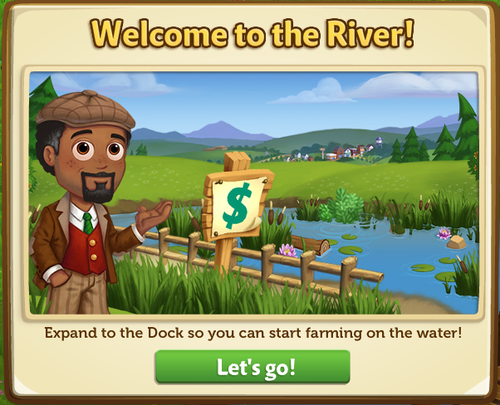
If you are level 15 or higher, you will see the following pop-up. Click on the “Let’s go” button to get started.


When you first arrive at the River, you’ll notice that things are a bit overgrown. Give yourself extra room to farm by clearing the riverbank and surrounding areas! Additional land will become available as you level up. 
Which Plots Can I Unlock?
You can unlock the bottom two expansions on the River, which are located on the right hand side of your game board.  To see what level you need to be in order to access land, hover your mouse over the plot. Eventually, you will be able to expand your farm to the entirety of the River bank.


River Expansion Check-off List:
Before you get your rubber boots on, you’ll need to check off a couple of things to ensure that you’re prepped for anything that the mighty River may offer:
  1. Level 15 or Higher – Farming on the River is no easy task, so our greener Farmers will need to improve their farming skills and prep before they get their feet wet.
  1. Camarillo Country Expansion – Since it’s not safe (or fun) to cross through overgrown grass, you’ll need unlock the Camarillo Country Expansion to access the River. Not to worry though! Once you complete the Expansion tasks, the wild and friendly goats will help you clear the space!
If you are level 15 or higher and have the Camarillo Country Expansion, click on the plot to get started.

Expanding Your Farm to the River:
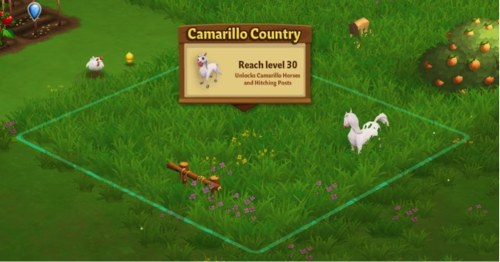
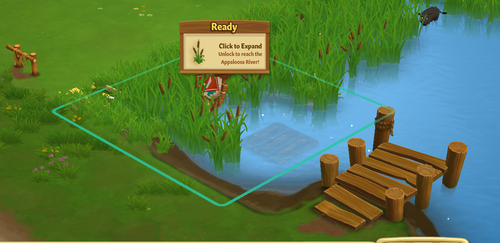
You can tell if a plot is available to expand on because you will see a sign pop up in the plot that looks like this:


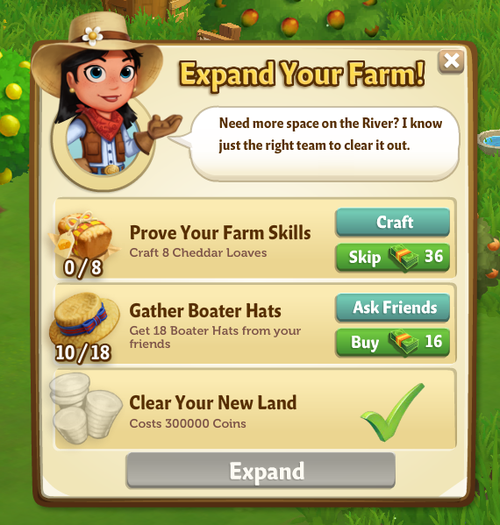
When you click on a plot to expand it, you will see a popup. In this popup, you will see a list of requirements you need to meet before you’re able to unlock a plot, like this:


Clearable Objects:
When you expand, there may be items on your new land that you do not want. Rocks and Debris need to be cleared away before you can use the space they are currently occupying.
How Do I Clear Something From a New Plot?
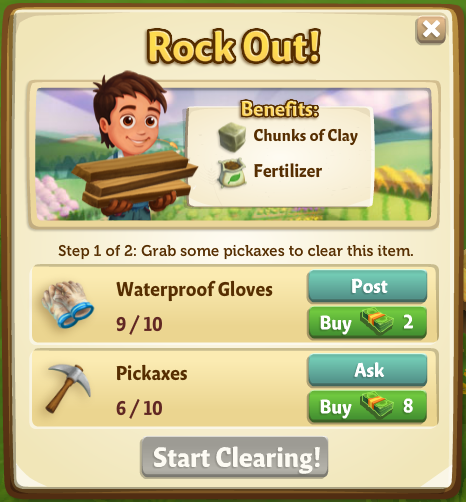
Clearing large objects isn’t easy—you’re going to need some help! To get started, click on the object you want to clear away. Once you do that, you will see a popup telling you what you need to do in order to clear the object:


This popup lets you know a few things: 
  • What you need to do to clear the object
  • How many tools or people you need to help you
  • What you will get once you clear the object away
In a hurry to clear an object and don’t want to wait for help from Neighbors? You can purchase the materials you need and hire help using Farm Bucks.

Clearing requires you to complete two steps: one to gather materials you’ll need to tackle the job, and another to hire the crew needed to complete the task.  
Gathering Materials
  • Gather the tools you need to clear debris away by asking your friends to send some your way.
  • You can do this by clicking the “Ask” button in the popup window. A message will be sent from you to your friends (you can choose which friends get this message), asking your friends to send you the tools that you need.
  • Don’t have time to wait? You can buy the tools you need with Farm Bucks.
Hiring a Crew 
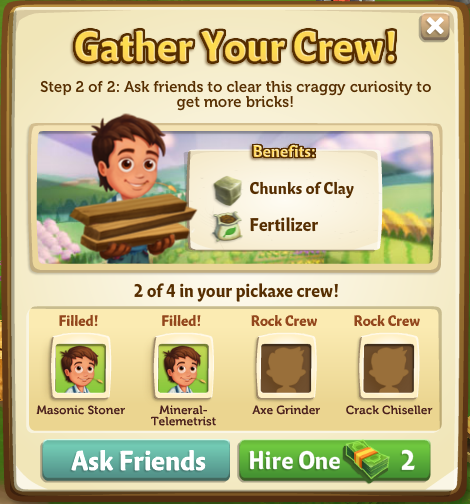
Once you have your Building Materials, you’ll get a second popup:


  • To complete this step, click the “Ask Friends” button to send a request to your friends for help.
  • If they accept your request, they will fill one of the open positions, and you will see their Facebook profile picture next to one of the positions you needed to fill.  
  • Don’t have time to wait on a crew of volunteers? You can also hire a crew by paying Farm Bucks for each position you need filled.
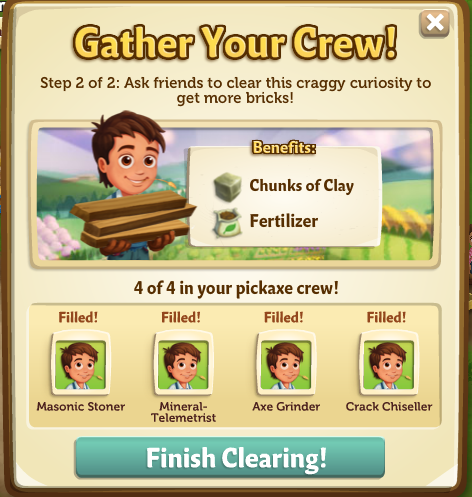
Once you have successfully filled all four spots, the “Finish Clearing” button in the popup will turn turquoise (see image below), meaning that you’re ready to go! Click on it to finish clearing the object away.


Rewards for Clearing an Object
As you clear objects from the River, you’ll receive great rewards! The rewards vary depending on what the object you’re clearing away is made of (for example, clearing a rock gets you Chunks of Clay and Fertilizer, while clearing a piece of wood debris gets you wood planks.) After your crew is finished clearing an object, you will see a nice pile of rewards where the object used to be. Hover your mouse over them to scoop them up and into your Inventory, or just wait and they will be collected for you automatically.
Expansion Requirements (Detailed): 
For each Expansion, there are a few requirements you need to meet in order to be able to uncover the land. Most Expansions require you to reach a certain level in the game and have a certain amount of coins and items in your Inventory in order to gain access. If you would like to view a list of the land Expansions that are available, check out our official guide: Expansion Guide.
20 – Appaloosa River – Unlocks when you expand Camarillo Country and reach level 15!
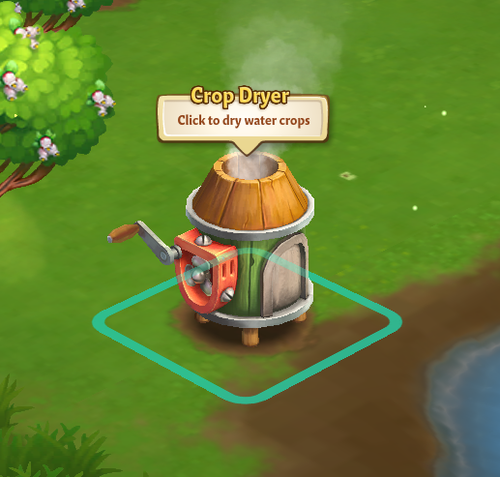
 Unlocks: Crop Dryer – If you would like a quick tutorial on how to use the Crop Dryer, check out the official feature guide:Crop Dryer.
21 – Buffalo Brook 
  • Reach Level 15
  • Expand to adjacent land
  • Prove Your Farm Skills: Craft 8 Cheddar Loaves
  • Gather Boater Hats: Get 18 Boater Hats from your friends
  • 750,000 Coins to Clear Land
Unlocks: Baby Black Water Buffalo 
22 – The Riverside 
  • Expansion Coming Soon!
23 – The Far Shore
  • Expansion Coming Soon!
*NOTE: Right now, the River is only available by purchasing Early Access with Farm Bucks. Sit tight, though—these plots will be available to earn for free soon!
Water Crops:
The River Expansions bring farming to the water! Once you have cleared your first River Expansion, you will find one Water Crop plot. Click it to check out the Water Crops available in the General Store:


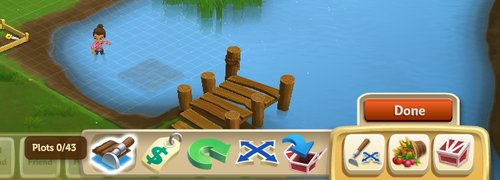
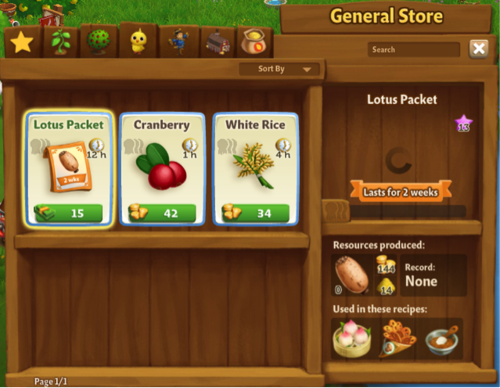
The great thing about Water Crops is that you don’t need to water them! Simply plant, Fertilize, and harvest your wet crops. Also, don’t forget to dry them in the Crop Dryer! If you would like to add additional empty Water plots to your farm, use the Water “Plots” button, located in the Tools Menu (see image below). Just click on the area where you would like a plot, and voila!


If you would like some practice with River Farming, be sure to check in with Gus for some tips. Click here for our official Dive Into River Farmving Guide. 
Note: You can add up to six Water plots per River Expansion.
Tip: Plant crops that fit your schedule. FarmVille 2 features a variety of Water Crops with varying harvest times. Planning ahead can save you the hassle of withered crops!
Crop Dryer:
Before you can sell or craft with your bountiful Water Crop harvests, you will need to build your Crop Dryer. For a quick tutorial on how to use the Crop Dryer, check out the official feature guide: Crop Dryer.


Additional Information: 
  • You are limited to six Crop plots per River Expansion.
  • You must dry your Water Crop harvests in the Crop Dryer prior to crafting in Recipes.
Now that you know how to expand to the River, the rest is up to you! Use the extra space to grow more Water Crops to earn Coins or just let the Water Buffaloes roam wild in the additional space!

The Fussy Teacup Pig!

26 November 2013 FarmMaster 0
Barbara is in search of a good home for the baby Teacup Pig, but she’s fussy and only eats Exotic Mushrooms! Help Barbara build a Pig Feasting Area, collect Exotic Mushrooms, and then you’ll earn some amazing prizes. Harvest your regular and Heirloom Trees for a chance to find Exotic Mushrooms, which you can redeem for all kinds of prizes, including the baby Teacup Pig!
If you are level 15 or higher, you will see the following pop-up. Click on the “Place” button to place the Feasting Area on your farm.
  The Fussy Teacup Pig - FarmVille 2
Building the Pig Feasting Area:
Your first step is building your Pig Feasting Area. You will need the following items to start construction:
  • Fancy Pig Pillows
  • Pig Treats
  • Pig Food Bowls
To collect Fancy Pig Pillows, click on the “Post” button to post to your Facebook wall; you will get the parts when your friends click on it, or when you click on a similar newsfeed post.
Click on the “Ask” button to send requests for Pig Treats and Pig Food Bowls to your Neighbors. If you do not wish to wait for your Friends, you can skip any of these tasks for Farm Bucks.
  The Fussy Teacup Pig - FarmVille 2
  
Once you have collected the required items, click on the “Start Building” button at the bottom of the construction menu.
Now that your Feasting Area is almost complete, you will need a little help from your Neighbors to finish the job. The Pig Feasting Area requires four additional helpers, so click on the “Ask Friends” button to send some crew requests to your Friends. When they accept, you will see the spots in the Building Menu begin to fill. If you do not wish to wait for your Friends, click on the “Hire One” button to purchase crew members with Farm Bucks. Once you have successfully filled all four spots, click on the “Finish and Share” button.
  The Fussy Teacup Pig - FarmVille 2
Using the Pig Feasting Area:
Click on the Pig Feasting Area to open the main menu. 
The Fussy Teacup Pig - FarmVille 2
 
  
This menu shows how many Exotic Mushrooms you have collected and what prizes you are currently eligible to redeem. 

A – The total amount of Exotic Mushrooms you have collected. As you redeem prizes, this number decreases.
B – If you want to send requests to your Friends for Small Mushroom Terrariums, which are used for Crafting Exotic Mushrooms. Note: You can have a maximum of 12 Small Mushroom Terrariums at any given time.
C – If you want to ask your Friends for Large Mushroom Terrariums, which are used for Crafting Exotic Mushrooms, press this button and a feed will be automatically posted to your wall. Note: You can have a maximum of 12 Large Mushroom Terrariums at any given time.
D – If you want to purchase Exotic Mushrooms for Farm Bucks.
E – The button to use when you want to collect Exotic Mushrooms by crafting in the Workshop. 
F – The button to use when you want to redeem a prize. Once you have enough Exotic Mushrooms, this button will turn turquoise.
G – The number of Farm Bucks required to purchase the prize.
Collecting Exotic Mushrooms: 
Harvesting Regular and Heirloom Trees: You can find Exotic Mushrooms by harvesting your regular and Heirloom Trees. If you find some, they will appear on your farm in a similar fashion to Prize Goods.
The Fussy Teacup Pig - FarmVille 2
 
Note: Harvest Heirloom Trees to increase your chances of finding Exotic Mushrooms!
  
When an Exotic Mushroom appears on your farm after harvesting, click on it and you will see the following pop-up:
The Fussy Teacup Pig - FarmVille 2
 
  
Click on the turquoise “Share” button to post a feed to your wall. Your Friends will be able click on this feed to claim some free Exotic Mushrooms for themselves too! Once you have clicked on the Mushroom, it will be automatically added to your Pig Feasting Area. 
Crafting: You can craft your very own Exotic Mushrooms via the Crafting Workshop. From the Pig Feasting Area menu, click on the “Craft” button to open the Workshop. The two Recipes for Exotic Mushrooms are as follows:
  
  • Grow 2 Mushrooms: To craft Grow 2 Mushrooms, you will need Small Mushroom Terrariums and Mud. Click on the “Ask” button to send requests for Small Mushroom Terrariums to your Friends. If you do not wish to wait for your Friends, you can skip any of these tasks for Farm Bucks. Note: To get Mud, feed your Adult Pigs (feeding Prized Pigs will not count).
The Fussy Teacup Pig - FarmVille 2
 
  
  • Grow 3 Mushrooms: To craft Grow 3 Mushrooms, you will need Large Mushroom Terrariums and Wheat. To collect Large Mushroom Terrariums, click on the “Post” button to post to your Facebook wall – you will get the parts when your friends click on it, or when you click on a similar newsfeed post.
Note: Individual Exotic Mushrooms can also be purchased with Farm Bucks from the Pig Feasting Area menu.
Redeeming Exotic Mushrooms for Prizes: 
Once you have collected enough Exotic Mushrooms, you can redeem them for some beautiful prizes. Click on your Pig Feasting Area to open up your progress menu. 

At the bottom of this menu, there are a total of four prizes that you can redeem for Exotic Mushrooms: 

  • 2x Mushroom Lights (22 Exotic Mushrooms)
  • Reward Bundle (44 Exotic Mushrooms) Note: You have a chance of earning Salt, Sugar, Speed-Feed, and/or Fertilizer
  • Mushroom Topiary (66 Exotic Mushrooms)
  • Mushroom Fountain (88 Exotic Mushrooms)
All four of these prizes can be redeemed as many times as you like, as long as you have enough Exotic Mushrooms (220 Exotic Mushrooms total). Once you have collected all four of the above prizes, you will earn the baby Teacup Pig!
The Fussy Teacup Pig - FarmVille 2
 
 
Note: The baby Teacup Pig can be redeemed for Exotic Mushrooms or Farm Bucks more than once.
It looks like the baby Teacup Pig has warmed up to you! Click on the “Share Exotic Mushrooms” button to post a reward feed for your Friends. Make sure to feed your little piggy Baby Bottles so she will grow into an Adult Teacup Pig that you can harvest for Mud and 3x Fertilizer! Note: Mud is an Ingredient used in exclusive Crafting Workshop and Crafting Kiln Recipes.
Additional Information:
  • You have 21 days to collect the Pig Feasting Area prizes. If you do not collect them all, the prizes will disappear and you will be unable to claim them.
  • If you do not wish to use the Pig Feasting Area feature, it can be sold or stored in your Inventory.
  • You can only get Exotic Mushrooms when harvesting regular and Heirloom Trees on your own farm. You will not get Exotic Mushrooms from Neighbor visits.
  • If you want to see how much time you have left to claim the Pig Feasting Area prizes, hover your cursor over the Feasting Area.
  • You are limited to one Pig Feasting Area per farm.

The Fall Bonfire!

20 November 2013 FarmMaster 0

The Fall Bonfire is here! Craft goods for Bonfire Parties with Friends and receive great gifts after each party. Complete all five of the Bonfire Parties and you will also earn a Red Bell Pepper Crop Packet!
If you are level 12 or higher, you will see the following pop-up. Click on the green “Place Fire Pit” button to place the Pit on your farm. 
Fall Bonfire - FarmVille 2
 
Before you can host a Bonfire Party, you will need to build your Fire Pit. Your first step is collecting Building Materials. You will need the following items to start building your Pit:
  • Kindling Piles
  • Limestone Bricks
  • Stone Hammers
To collect Kindling Piles, click on the “Post” button to post to your Facebook wall; you will get the parts when your friends click on it, or when you click on a similar newsfeed post.
Click on the “Ask” button to send requests for Limestone Bricks and Stone Hammers to your Neighbors. If you do not wish to wait for your Friends, you can skip any of these tasks for Farm Bucks.
Fall Bonfire - FarmVille 2
 
Note: You can send a request for materials to your Friends every 18 hours.
Once you have collected the required items, click on the “Start Building” button at the bottom of the construction Menu. 
Now that your Pit is almost complete, you will need to hire Friends to help you finish the job. The Fire Pit requires four additional helpers, so click on the “Ask Friends” button to send some crew requests to your Friends. When they accept, you will see the spots in the Building Menu begin to fill. If you do not wish to wait for your friends, click on the “Hire One” button to purchase crew members with Farm Bucks. Once you have successfully filled all four spots, click on the “Finish Building” button. 
Fall Bonfire - FarmVille 2
 
Bonfire Parties:
The Red Bell Pepper Crop Packet can be earned after a total of five stages. In order to earn it, you will need to host 5 Bonfire Parties for Friends. To prepare for a Bonfire Party, click on your Fire Pit.
Fall Bonfire - FarmVille 2
 
No Bonfire Party is complete without s’mores and snacks, so it’s time to start whipping up some delicious treats, goods, and supplies for your parties! From the Quest menu, click on the “Craft” button for the recipe you wish to Craft and you will be sent to your Kitchen and/or Workshop.
Note: Hosting a Bonfire Party uses up the goods you have crafted.
Stage One: 
  • Have Olive Oil
  • Have Lumber
  • Have Tinder
  Fall Bonfire - FarmVille 2
  
Stage Two: 
  • Have Pumpkin Pie
  • Have Tomato Soup
  • Have Vegetable Kabobs
Fall Bonfire - FarmVille 2
 
Stage Three: 
  • Have Milk Chocolate Bars
  • Have Marshmallow Candy
  • Have Graham Crackers
Fall Bonfire - FarmVille 2
Stage Four: 
  • Have Leather Journal
  • Have Votive Candle
  • Have Vintage Flashlight
  Fall Bonfire - FarmVille 2
Stage Five:
  • Have Feather Charm
  • Have Bonfire Banjos
  • Have Outdoor Pillows
Fall Bonfire - FarmVille 2
 
The Fall Bonfire requires four guests to be present before your party can begin, so click on the “Ask Friends” button to send some requests to your Friends. When they accept, you will see the spots in the Guest Menu begin to fill.
   Fall Bonfire - FarmVille 2
If you do not wish to wait for your Friends, click on the “Hire One” button to purchase guests with Farm Bucks. Once you have successfully filled all four spots, click on the “Kindle the Fire Now” button to kickoff the party!
Fall Bonfire - FarmVille 2
  
Once your Bonfire Party is complete, your guests will run off and you will see the following pop-up. Click on “Share Rewards” button to post a feed to your wall that your Friends can click to collect rewards, too!
Fall Bonfire - FarmVille 2
 
Earning Rewards with the Fall Bonfire:
You will earn rewards each time you host a Bonfire Party. The more Bonfire Parties you host, the more rewards you will receive at the end of each party. Below is a list of items you have a chance of earning: 
  • Power
  • Fertilizer
  • Speed-Feed
  • Speed-Grow
  • Baby Bottle
  • Piece of Wood
Fall Bonfire - FarmVille 2
 
 
Night Time Bonus:
In addition to these awesome rewards, you will receive a +1 Crop bonus for a limited time after each Bonfire Party! A small crescent moon icon above your Neighbor Bar will indicate the Bonus is active. Hover over this icon if you’d like to see how much time you have remaining until it expires (see image below):
Fall Bonfire - FarmVille 2

The Fall Bonfire reward icons at the bottom of the Guest Menu indicate how many parties you have hosted. As you host parties, you will see the Fall Bonfire reward icons will be replaced by green check marks.
  Fall Bonfire - FarmVille 2
  
You can host up to a total of five Bonfire Parties per Fire Pit and once you have finished your final party, you will earn a Red Bell Pepper Crop Packet! Click on the  “Place and Share” button to purchase your Crop Packet in the General Store for Coins.
Fall Bonfire - FarmVille 2
 
Additional Information: 
  • Once the Fire Pit is placed on your Farm, you have 20 days to finish the quests and host your Bonfire Parties with Friends.
  • You can have up to five Fire Pits on your farm (including frames).
  • If you delete the first Fire Pit, you will only be able to have a total of four. The second, third, fourth, and fifth Pits can be deleted or stored in your Inventory.
  • Once you have hosted your Bonfire Parties, you will be unable to use and/or sell any of the goods.
  • Once you have finished hosting all of your parties, the Fire Pits are yours to keep as decorations!

Harvest More Power!

20 November 2013 FarmMaster 0
Great news, Farmers!
You can now harvest your Furnace for Power every FOUR HOURS! What do you think of this new update? Leave us a comment below to share your thoughts with the FarmVille 2 Team.

The Crafting Drive Stage 2!

19 November 2013 FarmMaster 0
  
The Crafting Drive Booth Feature is broken up into three consecutive stages that unlock over time. Click the links below to find out more information about each stage.
Stage 1
Stage 2
Stage 3: Coming Soon!
The Crafting Drive Booth is here! Crafting in the Booth will earn you Points, which you can redeem for great rewards and the adorable baby Lionhead Rabbit!
Note: Animal Hospital Charity and the Crafting Drive Booth are fictional parts of the storyline in FarmVille 2, and are not actually affiliated with any real-world business or charity.
If you are level 12 or higher, you will see the following pop-up. Click on the “I’ll Help” button to get started.
  Crafting Drive - FarmVille 2
  
Before you can start crafting, you will need to build your Crafting Drive Booth. Your first step is collecting Building Materials. You will need the following items to start building your Booth:
  • Animal Balloons
  • Bunting Cloths
  • Bunny Posters
To collect Animal Balloons, click on the “Post” button to post to your Facebook wall – you will get the parts when your Friends click on it, or when you click on a similar newsfeed post.
  
Click on the “Ask” button to send requests for Bunting Cloths and Bunny Posters to your Neighbors. If you do not wish to wait for your Friends, you can skip any of these tasks for Farm Bucks.
Crafting Drive - FarmVille 2
  
Note: You can send a request for materials to your Friends every 18 hours.

Once you have collected the required items, click on the “Start Building” button at the bottom of the construction Menu. 

Now that the Crafting Drive Booth is almost complete, you will need a little help from your Neighbors to finish the job. The Crafting Drive Booth requires four additional helpers, so click on the “Ask Friends” button to send some crew requests to your Friends. When they accept, you will see the spots in the Build Menu begin to fill. If you do not wish to wait for your Friends, click on the “Hire One” button to purchase crew members with Farm Bucks.
Crafting Drive - FarmVille 2
Using the Crafting Drive Booth: 
Click on the Crafting Drive Booth to open the main menu.
  Crafting Drive - FarmVille 2
This menu shows how many Points you have earned in the current week, what rewards you have redeemed and what rewards you are currently working towards. It also shows your cumulative points that go towards earning the baby Lionhead Rabbit (Final Reward).
A – The Points Total (cumulative amount of Points you have earned during the Crafting Drive). You earn Points by crafting the Crafting Drive Recipes. Note: This number keeps counting up, and does not get reset every week (see “the Baby Lionhead” section below for more details).
B – If you want to ask your Friends for Points, click on this button and a request will post to your feed. 
C – The button to use when you want to purchase Points for Farm Bucks.
D – Use these arrow buttons to scroll through the Crafting Drive Recipes.
E – The button to use when you want to craft the Crafting Drive Recipes (earn Points).
F – The Crafting Drive Booth bar, which tracks your progress towards Milestone Goals and earning the babyLionhead Rabbit. Note: This bar will reset each week when the next Stage becomes available.
How to Get Points in the Crafting Drive:
There are multiple ways to get Points in the Crafting Drive:
  1. Crafting Recipes:
    1. The first Stage (Week 1) has 2 different Recipes, and then 2 new Recipes that are worth higher Points unlock the following Stages (Week 2 & 3).
    2. When new Recipes unlock, you can craft those, as well as the previously unlocked Recipes, which means you can craft up to 4 Recipes in parallel during Week 2, and up to6 Recipes during Week 3!
    3. Ask your Friends for Donation Points by posting a feed to your wall (See B. in the “Using the Crafting Drive Booth” section above).
    4. Use your Farm Helpers! Each Farm Helper will drop a Donation Package after they’ve completed a Neighbor Visit task.
    5. Purchase Points for Farm Bucks (See C. in the “Using the Crafting Drive Booth” section above).
Crafting Drive Recipes:
In order to earn Points, you must craft the Crafting Drive Recipes. From the Crafting Drive Booth menu, click on the “Craft Recipe” button to open the Recipe menu.
Stage 1
The two Recipes for the Week 1 are as follows:
  • Pet Collar: The required Ingredients are Wool and Rhinestone. You will receive a total of two Points per Pet Collar crafted. Note: To get Wool, feed your Adult Sheep and Adult Rabbits (feeding your Prized Sheep and Prized Rabbits do not count).
  Crafting Drive - FarmVille 2
  • Animal Blanket: The required Ingredients are Fur and Blueberries. You will receive a total of one Point per Animal Blanket crafted. Note: To get Fur, feed your Adult Buffalo and Adult Deer (feeding your Prized Buffalo and Prized Deer do not count).
Crafting Drive - FarmVille 2
Stage 2
The two Recipes for the Week 2 are as follows:
  • Pooper Scooper: The required Ingredients are Pieces of Wood and Copper Poop Scoop. You will receive a total of five Points per Pooper Scooper crafted. Note: To get Pieces of Wood, harvest your Pine Trees and White Willow Trees. 
   Crafting Drive - FarmVille 2
  • Porcelain Treat Bowl: The required Ingredients are Mud and Strawberries. You will receive a total of three Points per Porcelain Treat Bowl crafted. Note: To get Mud, feed your Adult Pigs (feeding your Prized Pigs do not count).
  Crafting Drive - FarmVille 2
  • Week 3 Recipes: Coming Soon!
    • Note: These Recipes will be worth SEVEN and TEN Points!
Farmhand Donation Packages:
In addition to Crafting, you can earn Points from your Farmhands. As you use your Farmhands, they will donate a Package to you for the Animal Hospital, which gives you Points in the Crafting Drive. These Packages linger on your farm and appear as a small blue box. Once you have found a Package, click on it and you will receive the following message:
Crafting Drive - FarmVille 2
Click on the “Open Booth and Share” button to share some Points with Friends!
Earning Rewards:
In order to earn the Crafting Drive rewards, you will need to accrue enough Points to hit your Milestone Goal. Once you have collected enough Points for your current Milestone Goal, they will be automatically redeemed for some great rewards. After you redeem each reward, a green check mark will appear to indicate what Milestone Goal has been reached. Click on your Crafting Drive Booth to open up your progress menu. 
Stage 1
The Milestone Goals and respective rewards for Week 1 are as follows: 
  • Milestone 1:  +6 Speed-Grow
  • Milestone 2:  +10 Speed-Grow
  • Milestone 3:  +20 Speed-Grow
  • Milestone 4:  +34 Speed-Grow
Stage 2
The Milestone Goals and respective rewards for Week 2 are as follows: 
  • Milestone 1:  +10 Fertilizer
  • Milestone 2:  +16 Fertilizer
  • Milestone 3:  +30 Fertilizer
  • Milestone 4:  +64 Fertilizer
Stage 3 – Coming Soon!
The Baby Lionhead Rabbit:
The final reward for the Crafting Drive Booth is the baby Lionhead Rabbit. In order to earn this adorable Rabbit, you will need to earn enough Points (Points Total) towards the Crafting Drive Goal. The Crafting Drive Goal is based on the cumulative Points you get over the 3-week period, and can be redeemed for the baby Lionhead Rabbit as soon as the Goal has been reached.
  Crafting Drive - FarmVille 2
 If you do not want to wait to get the baby Lionhead Rabbit, you can use Farm Bucks to get enough Points and unlock the Rabbit right away! 
Additional Information:
  • Every week, the Crafting Drive Booth bar is reset and you will now work towards a new set of rewards. Note: Your Points Total (number below the baby Lionhead Rabbit) will not be reset.
  • You have 21 days to collect the rewards. If you do not collect them all, the rewards will disappear and you will be unable to claim them.
  • If you want to see how much time you have left to claim the Crafting Drive Booth rewards, click on the 
    Booth and look at the timer below the “Get a Bunny.”
  • You are limited to one Crafting Drive Booth per farm.
  • The Crafting Drive Booth is unmovable.
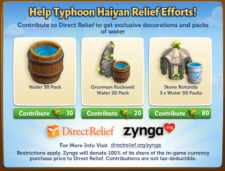
Support Typhoon Haiyan Relief Efforts!

15 November 2013 FarmMaster 0
Direct Relief is partnering with Zynga to support relief efforts following Typhoon Haiyan in the Philippines. Show your support by contributing to Direct Relief, and get exclusive decorations & packs of Water. 
Restrictions apply. Zynga will donate 100% of its share of the in-game currency purchase price to Direct Relief. Contributions are not tax-deductible. For more information, visit: http://www.directrelief.org/zynga

The Pasture & Fuel Pump!

14 November 2013 FarmMaster 0

This feature is currently only available to players who have purchased Early Access. For more information about this, please see our official guide: Early Access to the Pasture is here!

Introducing, the Pasture! Use the Pasture to store an unlimited number of your Prized Animals, and then harvest it to fill your Fuel Pump!
If you are level 15 or higher, you will see the following pop-up. Click on the “See your Pasture” button to get started.


The next step is to place your Fuel Pump on your farm (not the Pasture). Now, the best part is that the Pump is already built for you! (See the “Fuel Pump” section below for more details). After you’ve placed the Pump on your farm, Walter will pay you a special visit.
The Pasture - FarmVille 2
 
The third step is to click on the bouncing yellow arrow, which will then bring up the Pasture menu. From this menu, click on the “Add Prized Animals” button to automatically add all of your Prized Animals from the farm to the Pasture!
Note: This will only add the Prized Animals on your farm. It will not automatically add the Prized Animals in storage buildings or your Inventory.
  The Pasture - FarmVille 2
  
Inside the Pasture:
Click on the Pasture to open the main menu.
The Pasture - FarmVille 2
 
This menu shows you all of the Prized Animals that are inside the Pasture, your current population, and how many Prized Animals you will need to upgrade your Fuel Pump. 

A – The total number of Prized Animals in the Pasture

B – Use these tabs when you want to sort through your Prized Animals by category
C – Use these arrow buttons to scroll through all of your Prized Animals in the Pasture
D – Minus Symbol: Use this button when you want to remove a Prized Animal from the Pasture (Note: This button is only available when you hover over a placement card from this menu)
E – Use this button when you want to store a Prized Animal (wandering on your farm) in the Pasture (Note: This button will grey out when there are no Prized Animals available)
F – Use this button when you want to upgrade your Fuel Pump (Note: This button will disappear where there are no upgrades available)
G – Your current Fuel Pump Capacity
H – Use this checkbox when you want to store all of your Prized Animals (wandering on your farm) with one click in the Pasture
  
Using the Pasture:
We’ve made it even easier to store your Prized Animals in the Pasture from the farm! Once you’ve Prized an Animal, you will see the following pop-up if the respective storage building is full. Click on the “Send to Pasture” button to automatically send your Prized Animal to the Pasture. Note: If a Fuel Pump upgrade is available, you will see a “Pasture and Upgrade” button on the pop-up. Click on this button to bring up the “Upgrade your Fuel Pump” pop-up and begin collecting the building parts for the upgrade.
  Pasture - Send to Pasture
The Fuel Pump
One of the many benefits of storing Prized Animals in the Pasture is they keep the grass trimmed down, which results in the production of resources for the Fuel Pump!
The Pasture - FarmVille 2
 
Using the Fuel Pump:
The first time you click on your Fuel Pump, you will receive some FREE Fuel! Afterwards, there will be an 18-hour cooldown period. Overtime all of your Prized Animals in the Pasture will produce the resources that are required to fill the Fuel Pump. To get Fuel, all you have to do is store Prized Animals in the Pasture, and then harvest the Fuel Pump after the cooldown of 18-hours.
The Pasture - FarmVille 2
 
Helpful Tip: The more Prized Animals in your Pasture and the greater the Fuel Pump Capacity, the more Fuel you get from your Pump!
Upgrading the Fuel Pump:
In order to get the most Fuel out of your Pump, you will need to upgrade it relative to the number of Prized Animals in your Pasture. Currently, you can upgrade your Fuel Pump to a maximum of 45 Capacity. Each upgrade will differ slightly in appearance from the previous Pump. Note: You will only get the extra Fuel from your additional Prized Animals if you upgrade the Fuel Pump.
Once you unlock a new upgrade for your Fuel Pump, you will see the message, “Click to upgrade” after harvesting your Pump:
The Pasture - FarmVille 2
In addition to this, the green “Upgrade” button on the Pasture menu will be visible (see the “Inside the Pasture (F.)” section above).
Each upgrade will require different parts. Below is a list of the different items you may need to collect in order to upgrade:
  • Propellers
  • Gear Differentials
  • Aluminum Metal Plates
  • Bolt Cutters
  • Hatch Doors
  • Rubber Hoses
Below is an example of the “Upgrade your Fuel Pump” pop-up:
The Pasture - FarmVille 2
 
From the “Upgrade your Fuel Pump” pop-up, click on the “Post” button to post a request to your Facebook wall – you will get the parts when your Friends click on it, or when you click on a similar newsfeed post.
Click on the “Ask” button to send requests for parts to your Neighbors. If you do not wish to wait for your Friends, you can skip any of these tasks for Farm Bucks.
Note: You can send a request for materials to your Friends every 18 hours.

Once you have collected the required items, click on the “Start Building” button at the bottom of the construction Menu. 

Once you have collected the building parts, you will need a little help from your Neighbors to finish the job. The Fuel Pump upgrades require four additional helpers, so click on the “Ask Friends” button to send some crew requests to your Friends. When they accept, you will see the spots in the Build Menu begin to fill. If you do not wish to wait for your Friends, click on the “Hire One” button to purchase crew members with Farm Bucks.
Below is an example of the “Hire Upgrade Crew” pop-up:
  The Pasture - FarmVille 2
Once you have filled all four spots, click on the “Finish and Share” button to complete the Fuel Pump upgrade and start regenerating extra Fuel!
Fuel-Dependent Buildings:
Fuel is an important resource, as it’s required to use the Fertilizer Plane and the Crop Dryer. In order to maximize your Fuel Pump to get the most Fuel, be sure to store all of your Prized Animals in the Pasture and upgrade whenever available!
In a hurry to get Fuel? You can purchase packs of Fuel from the General Store or you can send requests for Fuel to your Friends.
The Pasture - FarmVille 2
 
Note: Some players may not have access to all of the features listed above. To ensure that FarmVille 2 remains an enjoyable experience for as many players as possible, we are slowly releasing content over the coming months. We are very excited to get these features out to all of you as soon as possible, and we appreciate your continued patience. 
Additional Information:
  • You are limited to one Fuel Pump per farm. 
  • You are limited to one Pasture per farm.
  • If you want to see how much time you have remaining until you can harvest the Fuel Pump, hover your cursor over the Pump.
  • If you want to see how many more Prized Animals are required until you can upgrade your Fuel Pump, hover your cursor over the Pasture.