The Luck of the Irish!

5 March 2013 FarmMaster 0

Greetings, Farmers!

New
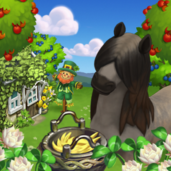
Limited Edition ‘The Luck of the Irish’ items are now available in the
General Store. Check out the information below for more details about
our latest release and be sure to let us know what your favorite new
addition is! It is hard to pick just one, but the Irish Cob Horse sure
is adorable!

New Limited Edition items:

  • Ivy Cottage – 43 Farm Bucks
  • Shamus Shillelagh – 14 Farm Bucks
  • Irish Bouquet – 8 Farm Bucks
  • Eternal Braid Floral Trellis – Farm Bucks
  • Celtic Cauldron – 2,250 Coins

New Limited Edition Trees:

  • Blackthorn Tree – 12 Farm Bucks
  • Irish Strawberry Tree – 12 Farm Bucks

New Limited Edition Animals:

  • Irish Cob Horse – 43 (Baby 30) Farm Bucks
  • Irish Moiled Cow – 43 (Baby 30) Farm Bucks

New Limited Edition Crops:

  • White Clover – 40 Coins, matures in 2 hours

New Crafting Kitchen Recipes:

  • White Clover Tea – Level 7
  • Irish Strawberry Shortcake – Level 7
  • Blackthorn Jam – Level 7

Grove Guide!

2 March 2013 FarmMaster 0

Got
Tree crowding? Save some Water and space on your Farm with Groves! Store up to
four Trees and water all at the same time with one single click.

If
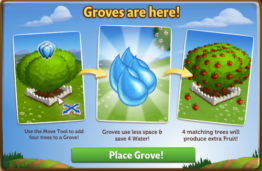
you are level 10 or higher, you will see the following pop-up. Click on “Place Grove”
to get started.


Building
the Grove


Your first step
is collecting construction parts. You will need the following items to start
building your Grove:

  • Buckets of Paint
  • Bags of Grove Soil
  • Wood Planks

Click
on the “Ask” button to send Building Material requests to
your Neighbors. If you do not wish to wait for your friends, you can skip any
of these tasks for Farm Bucks.


Groves - Start

Note: You can send
a request for materials to your Friends every 18 hours.


Once you have
collected the required items, click on the “Start Building!” button at the
bottom of the construction Menu.


Groves - Start Build

Now
that the Grove is almost complete, you will need a little help from your
Neighbors to finish the job. The Grove requires 4 additional mechanics, so
click on the “Ask Friends” button to send some crew requests to your Friends.
When they accept, you will see the spots in the Build Menu begin to fill. If
you do not wish to wait for your friends, click the “Hire One” button to
purchase crew members with Farm Bucks.


Groves - Finish

Using
the Grove

In order to use the Grove, you will need a total of
four Trees. Click on the empty Grove to open the main menu. 


Groves - Fill

Inside
the empty Grove, click on the green “Add Trees” button to use the Move Tool and
place up to four Trees. Trees will take up
one spot in your Grove regardless of the type (see below: Pecan Tree).


Groves - Pecan

Adding
& Removing Trees


Once you have watered your Trees, you cannot remove
them from the Grove until they have matured. If you wish to remove them from
the Grove before this, you can use Speed-Grow to instantly mature your Trees so
they can be removed.

Note: Any watered Tree outside of the Grove will lose its Water once placed
inside the Grove.

To
add a Tree in the Grove, click on the Grove and then the green “Add Tree”
button. All of your available Trees will automatically highlight in blue.


Groves - Move

Tip: Because the
Grove timer is an average of all of the Trees inside, keep groups of Trees
together to reduce the time it takes to mature. Bonus: This will also maximize the Tree output!

To
remove a Tree from the Grove, open the Tools menu (tools icon) on the bottom right
hand corner of the game screen. Select the “Move Tool” to click on the Tree,
then drag and drop it into the Grove.


Groves - Remove Tree

Additional
Information
:

  • If you do not wish to use the Grove
    feature, the first Grove can be sold (frame only) or stored in your
    Inventory.
  • If you want to see how much time you
    have left to harvest, hover your cursor over the Grove.
  • You can can have as many Groves on your farm as you like! 
  • You can purchase additional Groves in
    the General Store for Coins and Farm Bucks.
  • Rotate the Grove to view a different
    angle! (
    Rectangular Grove only)

Sheep Shack Guide!

27 February 2013 FarmMaster 0

Hey
Farmers,

The
Sheep Shack has arrived in FarmVille 2!

Use this new building to store your Prized Sheep and feed
them all with a single click! If that wasn’t enough, Prized Sheep in the Shack
will only require half the Feed and you also gain an additional
+25 Feed Capacity.

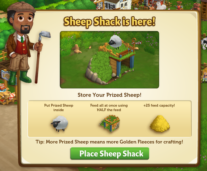
If
you are level 9 or higher, you will see the following pop-up. Click on “Place Sheep
Shack” to get started.


Building
the Sheep Shack


Your first step is collecting construction parts. You will need the following
items to start building your Sheep Shack:

  • Sheep Railings
  • Crooks
  • Sod

To
collect Sheep Railings, click on the “Post” button to post to your Facebook
wall – you will get the parts when your friends click on it, or when you click
on a similar newsfeed post.

Click
on the “Ask” button to send requests for Crooks and Sod to
your Neighbors. If you do not wish to wait for your friends, you can skip any
of these tasks for Farm Bucks.

Sheep Shack - FarmVille 2

Note: You can send
a request for materials to your Friends every 18 hours.


Once you have collected the required items, click on the “Start
Building!” button at the bottom of the construction Menu. 

Sheep Shack - FarmVille 2

Now
that the Sheep Shack is almost complete, you will need a little help from your
Neighbors to finish the job. The Sheep Shack requires 4 additional mechanics,
so click on the “Ask Friends” button to send some crew requests to your
Friends. When they accept, you will see the spots in the Build Menu begin to
fill. If you do not wish to wait for your friends, click the “Hire One” button
to purchase crew members with Farm Bucks.

Sheep Shack - FarmVille 2

Using
the Sheep Shack

Click on the Sheep Shack to open the main
menu. 

Sheep Shack - FarmVille 2

Inside
the Sheep Shack you will see placements that you can fill with Prized Sheep. Prized
Sheep will take up one spot in your Shack regardless of breed (see below: White
Sheep).

 
Sheep Shack - FarmVille 2

Adding
& Removing Sheep

To
add Prized Sheep in the Shack, check the “Auto Fill” box and click on the green
“Add Prized Sheep” button. All of your Prized Sheep will automatically jump
into the Shack!

To
remove a Prized Sheep from the Shack, open the main menu and click on the red
“–“ (minus symbol) box on the bottom left hand corner of the placement slot
(see below: A).

The
Sheep cards have symbols on them to indicate different things:


Sheep Shack - FarmVille 2
 

A. Minus
Symbol
: Remove Sheep


B. Feed: How much Feed the Sheep will consume


C. Fleece: How much Sheep Cheese the Sheep will produce (see
below: Feeding).

Feeding

Prized
Sheep stored in the Shack will eat half of the amount of Feed they
normally do. For example, a Sheep that eats 8 Feed outside of the Shack will eat 4 Feed when inside the Shack. Note:
Any Prized Sheep that would normally eat an odd amount of feed outside of
the Sheep Shack will be rounded up by one. For example, a Sheep that would
normally eat 9 Feed will only need 5 Feed when stored in the Sheep Shack.

Golden Fleece

Each time you harvest the Sheep Shack you have a chance of
finding a Golden Fleece, which can be used in exclusive Crafting Workshop
Recipes. Golden Fleece will linger on your farm similar to Prized Crops, so be
on the lookout for them after feeding!

Note: Clicking on
the Golden Fleece will automatically add it to your Inventory.

Sheep Shack - FarmVille 2

Tip: Fill up your
Sheep Shack for a greater chance of finding more Golden Fleeces!

Additional
Information
:

  • Once your Sheep Shack is completed, you now have +25 Feed Capacity!
  • The timer for your Sheep Shack will pause when placed in Storage, and
    then resume once placed back on your farm.
  • If you do not wish to use the Sheep
    Shack feature, it can be sold (frame only) or stored in your Inventory.
  • If you want to see how much time you
    have left to harvest, hover your cursor over the Shack.
  • You are limited to one Sheep Shack per
    farm.
  • Rotate the Shack to view a different
    angle!

Land Expansions Guide!

26 February 2013 FarmMaster 0

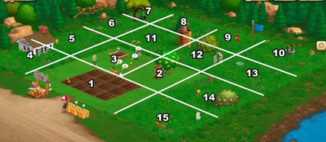
Few Expansions are for coins and some of them are for Farm Bucks. When you reached in the higher level than you need to expand so here are writing all details about the expansion for your farm.
Expansion 1: Starting Land in the Game

Expansion 2:
 Feed Mill
  • 175 coins
Expansion 3: Family Well
  • Have 4 Eggs
  • 1,000 coins
Expansion 4: Crafting Kitchen
  • Reach Level 5
  • Have 5 Trees
  • Gather 6 Milk
  • 2,000 coins
Expansion 5: West Meadow, Cottontail Rabbits
  • Reach Level 8
  • Craft 2 Apple Scones
  • Gather 5 Garden Clippers from friends
  • 20,000 coins
Expansion 6: Milk Meadow, Longhorn Cows, Extra Water Trough
  • Reach Level 11
  • Have 11 Adult Animals
  • Gather 7 Iron Hoes
  • 50,000 coins
Expansion 7: Playground, Tire Swings
  • 100 Farm Bucks for Early Access
Expansion 8: East Woodlands, Pine Trees for Logs
  • 100 Farm Bucks for Early Access
Expansion 9: The Horse Wilds, Appaloosa Horse and Flags
  • 100 Farm Bucks for Early Access
Expansion 10: Waterpatch, Extra Well
  • 100 Farm Bucks for Early Access
Expansion 11: The Old Silo, More Feed Silo
  • Reach Level 15
  • Craft 3 Apple Pies
  • Gather 10 Pitch Forks
  • 125,000 coins
Expansion 12: Mango Gardens, Peach Trees, Ivy Trellis Arches
  • Reach Level 20
  • Have 1 Adult Black Arabian Horse
  • Gather 13 Chainsaws
  • 300,000 coins
Expansion 13: Golden Chicken Colony, Cochin Chickens, Concrete Birdbaths
  • Reach Level 24
  • Craft 5 Banana Cream Cakes
  • Gather 15 Produce Crates
  • 500,000 coins
Expansion 14: Apricot Acres, Apricot Trees, Dinner Bell
  • Reach Level 28
  • Have 8 Saddles
  • Gather 18 Garden Gloves
  • 750,000 coins
Expansion 15: Camarillo Country, Camarillo Horses, Hitching Posts
  • Reach Level 30
  • Craft 8 Apricot Trifles
  • Gather 20 Garden Clippers
  • 1 million coins

New Fertilizer Bin Guide!

20 February 2013 FarmMaster 0

Hey Farmers,

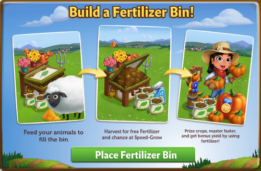
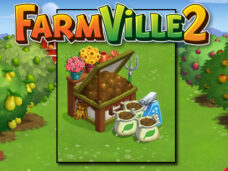
Do you need more Fertilizer? If so, the new Fertilizer Bin
is for you! Feed your animals to fill the Bin and then harvest it to earn free
Fertilizer for your crops. If that wasn’t enough, you also have a chance of
earning Speed-Grow when you collect from your Fertilizer Bin, so head on over
to FarmVille 2 and start building today!

If you are level 8 or higher, you will see the following
pop-up. Click on “Place Fertilizer Bin” to get started.


Building the Fertilizer Bin


Your first step is collecting construction parts. You will need the
following items to start building your Fertilizer Bin:

  • Green Paint
  • Grass Clippings
  • Wood Plank

For the Green Paint, click on the “Post” button to post to
your Facebook wall – you will get the parts when your friends click on it, or
when you click on a similar newsfeed post.

To collect Grass Clippings and Wood Planks, click on the
“Ask” button to send requests for the items to your Neighbors.

You can also purchase any of these items above for Farm Bucks
if you do not wish to wait for your friends to respond to your requests or newsfeed
posts.

Fertilizer Bin - FarmVille 2

Note: You can post a request for Green Paint to your
newsfeed every 16 hours and send requests for Grass Clippings and Wood Planks to
your Friends every 18 hours.


Once you have collected the required items, click on the “Start Building!”
button at the bottom of the construction Menu. 

Fertilizer Bin - FarmVille 2

Now that the Fertilizer Bin is almost complete, you will
need a little help from your Neighbors to finish the job. The Fertilizer Bin
requires 4 additional mechanics, so click on the “Ask Friends” button to send
some crew requests to your Friends. When they accept, you will see the spots in
the Build Menu begin to fill. If you do not wish to wait for your friends,
click the “Hire One” button to purchase crew members with Farm Bucks.

Once you have successfully filled all 4 spots, click on the
“Finish & Share” button.

 
Fertilizer Bin - FarmVille 2

Using the Fertilizer Bin

You must have at
least one Adult Animal on your farm that is
not Prized for the Bin to be
functional. When you feed your Animals, they will fill your Fertilizer Bin
Meter with compost, which is a new type of material
that can only be
used with this feature.

Collected
compost
will be automatically added to your Fertilizer Bin Meter. Once your
Meter is full, you can harvest the Bin with a Fertilizer Rake
(see below) for extra Fertilizer.

To see your Meter, click on the Fertilizer Bin to open the
main menu. Your Meter is located on the left-hand side of this screen. The
number at the bottom of the Meter indicates how much compost you need to
collect and your current progress towards this goal.

Fertilizer Bin - FarmVille 2

Additionally, you can also see your progress by hovering
your mouse over the Bin to display the green progress bar.

Fertilizer Bin - FarmVille 2

Fertilizer Rakes & Harvesting your Bin

Once you have
collected the necessary amount of compost, you will need one Fertilizer Rake to
harvest your bin. You can craft your Rake in the Workshop with two Pieces of
Wood. Click on the turquoise “Craft” button to head on into the Crafting
Workshop.

Fertilizer bin - FarmVille 2

Once you are inside
the Crafting Workshop, you will need two “Piece of Wood” to craft the Rake.

Fertilizer bin - FarmVille 2

Note: If you do
not want to craft a Fertilizer Rake, you can use Farm Bucks to skip these steps
and get it right away.

A cute butterfly
flying over the Bin will indicate it is full. Once you have crafted your
Fertilizer Rake, harvest your Bin by clicking on it. When you harvest your Bin,
you will always produce extra Fertilizer, which can be used on Crops &
Trees.

Fertilizer bin - FarmVille 2

Note: Any extra
Fertilizer you produce will be automatically added to the Fertilizer total at
the top of the game screen.

Fertilizer bin - FarmVille 2

In addition to Fertilizer, you have a chance of earning
Speed-Grow when you harvest your Bin!

Additional Information:

  • Minimum of one Adult Animal (non-Prized) on any
    given farm is required to use the Fertilizer Bin.
  • Rotate the Bin to view a different angle!
  • If you do not wish to use
    the Fertilizer Bin feature, it can be sold (frame only) or stored in your
    Inventory.
  • If you want to see how much
    compost is needed to harvest, hover your cursor over the Bin.
  • Limited to one Fertilizer
    Bin per farm.
  • You can only have a total
    of 5 Fertilizer Rakes in your Inventory at one time. Note: You can purchase additional Rakes (more than 5) with Farm Bucks.

Build Fertilizer Tank!

15 February 2013 FarmMaster 0

FarmVille 2 Fertilizer Tank has arrived now you can build it and you
will be able to make and store fertilizer there to get the double output
from your crops.
As we have just explained to you very soon we are going
to build a fertilizer tank that we will never miss fertilizer can
fertilize our crops and have every time you reap the vessel a chance to
get 1 + rapid Grow Obviously this new build comes with a series of 8 new
missions we will give you full details.


Success fertile 1 of 8 – A dirty secret
I discovered a secret any beast animals produce fertilizer. Fantastic!

  • Place a fertilizer tank to recover this valuable resource
  • Tomato crop plots to return land
  • Draws water in your well water for your crops

Success fertile 2 of 8 – In the tank up to the neck
Despite the smell, I know you do not rechigneras task.

  • Retrieves pairs of gloves for the compost to avoid get dirty
  • Harvesting trees for wood
  • Factory rake fertilizer use your fertilizer tank

Success fertile 3 of 8 – Ready to collection
Use this fertilizer tank and double your production.

  • Completes the fertilizer tank
  • Feed your adult hens to begin filling the tank fertilizer
  • Uses the tank when it is full fertilizer

Success fertile 4 of 8 – The right tools
You’ll have to use special tools for fertilizer. Especially, clean them after each use.

  • Retrieves shovels compost for fertilizer
  • Feed your adult goats to fill your tank with fertilizer
  • Manufactures rakes fertilizer for fertilizer tank

Success fertile 5 of 8 – favorite beans
These beans will not stay here long, but fertilizer can double the production of each crop.

  • Fertilize 20 plots of beans to understand my advice
  • Harvest 20 plots of beans to get double resources
  • Prepares sauces appetizer bean

Success fertile 6 of 8 – On the application!
Do not release the pressure. The fertilizer requires compliance cycle. Feed your animals and their excrement recovers .

  • Own wood to make the rakes
  • Manufactures fertilizer rakes for spreading best
  • Uses the fertilizer tank and gets great rewards fragrant

Success fertile 7 of 8 – It’s your choice
The fertilizer suitable for all crops. If only we could double production animals easily.

  • Retrieves compost buckets for all the fertilizer
  • Fertilizes the crops of your choice
  • Feed your adult hens to fill your tank with fertilizer

Success fertile 8 of 8 – Again!

Florist Table – Progress Confusion

13 February 2013 FarmMaster 0

Hey Farmers!

It has come to our attention that some players are a bit
confused about the functionality of the Florist Table, so we wanted to clarify
some details for everyone.

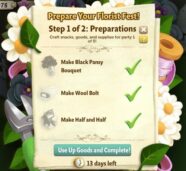
After you have built the Florist Table, you have to prepare
for your Florist Fest. This involves Crafting Black Pansies, Wool Bolts and
Half & Half.

Once you have crafted these items, you must keep them in your Inventory until the “Use Up Goods and
Complete!” button appears. Selling these items before clicking this button will
result in a loss of progress.


We understand that this may be a tad confusing, so we will
be updating the text in this menu to clarify the requirements a bit more. Thank
you for your continued support and we hope you are enjoying the Florist
Festival!

“New Spinning Wheel” Guide!

13 February 2013 FarmMaster 0

Hey Farmers!

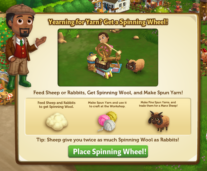
Yearning for Yarn? Then you will love the new Spinning Wheel!
Feed Sheep and Rabbits to collect Spinning Wool, which you can then turn into
Spun Yarn. Collect special types of Spun Yarn to earn the exclusive Manx Loaghtan Sheep!

If you are level 8 or higher, you will see the following
pop-up. Click on “Place Spinning Wheel” to get started.


Building the Spinning Wheel


Your first step is collecting construction parts. You will need the
following items to start building your Spinning Wheel:

  • Empty Spindle
  • Basket
  • Wood Plank

For the Empty Spindle, click on the “Post” button to post to
your Facebook wall – you will get the parts when your friends click on it, or
when you click on a similar newsfeed post.

To collect Baskets and Wood Planks, click on the “Ask”
button to send requests for the items to your Neighbors.

You can also purchase any of these items above for Farm
Bucks if you do not wish to wait for your friends to respond to your requests
or newsfeed posts.


Spinning Wheel - FarmVille 2

Note: You can post a request for Empty Spindles to
your newsfeed every 16 hours and send requests for Baskets and Wood Planks to
your Friends every 18 hours. 

Once you have collected the required items, click on the “Start
Building!” button at the bottom of the construction Menu. 


Spinning Wheel - FarmVille 2

Now that the Spinning Wheel is almost complete, you will
need a little help from your Neighbors to finish the job. The Spinning Wheel
requires 4 additional mechanics, so click on the “Ask Friends” button to send
some crew requests to your Friends. When they accept, you will see the spots in
the Build Menu begin to fill. If you do not wish to wait for your friends,
click the “Hire One” button to purchase crew members with Farm Bucks.

Once you have successfully filled all 4 spots, click on the
“Finish & Share” button.


Spinning Wheel - FarmVille 2

Using the Spinning Wheel

You must have at
least four adult Sheep and/or Rabbits on your farm that are not Prized
for the Wheel to be functional. When you feed your Sheep and Rabbits, they will
drop Spinning Wool, which is a new type of Wool that can only be used
with this feature.

Collected Spinning
Wool will be automatically added to your Spinning Wheel Basket. Once your
Basket is full, you can harvest the Wheel for Spun Yarn.

To see your Basket, click on the Spinning Wheel to open the
main menu. Your Basket is located on the left-hand side of this screen. The
number at the bottom of the Basket indicates how much Spinning Wool you need to
collect and your current progress towards this goal.

Spinning Wheel - FarmVille 2

Additionally, you can also see your progress by hovering
your mouse over the Wheel to display the green progress bar.


Spinning Wheel - FarmVille 2

Once you have
collected the necessary amount of Spinning Wool, you will be able to harvest
your Wheel by clicking on it. When you harvest your Wheel, you will always
produce Spun Yarn, which can be used in exclusive Crafting Workshop Recipes.

Note: Any
Spun Yarn you produce will be automatically added to the “All” section of your
Inventory.

Fine Yarn

To earn the Manx Loaghtan Sheep, you will need to collect
special types of Spun Yarn. To find these Special Yarns, all you need to do is
keep harvesting your Spinning Wheel! In addition to the Spun Yarn you earn
every time you harvest the Wheel, you also have a chance of earning Special
Yarn (referred
to as “Fine Yarn” in game
).

There are three types of Special Yarn you can receive: 


1. Fine (6 Needed)


2. Super-Fine (4 Needed)


3. Premium (2 Needed)

These Yarns are not used for Crafting like the Spun Yarn.
Instead, they are automatically added to your Yarn Collection. To earn the Manx
Loaghtan Sheep, you will need to have 6 Fine Yarn, 4 Super-Fine Yarn and 2
Premium Yarn (12 total) in your Collection. Once you have collected these, you
can trade them in for the Manx Loaghtan Sheep!

Special Yarns linger on your farm similar to Prized Crops.
Just click on the Yarn and it will be added to your Collection.


Spinning Wheel - FarmVille 2

The more adult Sheep and Rabbits you have on your Farm, the
better your chances are of receiving Fine Yarn!

Helpful Tips

  • Animals that give more Wool fill the station
    more quickly. For example, a Rabbit that produces 5 Wool contributes 5 Spinning
    Wools to the Wool Basket, where as a Rabbit that produces 1 Wool only contributes
    1 Spinning Wool.
  • For the same amount of Wool produced, Sheep fill
    the Wheel 2x faster than Rabbits.
    For example, a Rabbit that produces 3 Wool contributes 3 Spinning Wool to the Basket,
    but a Sheep that produces 3 Wool contributes 6 Spinning Wool to the
    Basket.

In addition to Spun Yarn, harvesting the Wheel will give you
additional XP points to help you level!


Spinning Wheel - FarmVille 2

If you do not want to wait to collect the Special Yarn, you
can use Farm Bucks to skip these steps and get the new baby Manx Loaghtan Sheep
right away!


Spinning Wheel - FarmVille 2

Your new Manx Loaghtan Sheep needs baby bottles to reach
adulthood, just like your other animals. Once it has matured, it will produce Brown Wool, which can be used in
exclusive Crafting Recipes.

Additional Information:

  • Minimum of four Sheep and/or Rabbits on any
    given farm is required to use the Spinning Wheel.
  • If you do not wish to use
    the Spinning Wheel feature, it can be sold (frame only) or stored in your
    Inventory.
  • If you want to see how many
    Spinning Wools are needed to harvest, hover your cursor over the Wheel.
  • Limited to one Spinning
    Wheel per farm.
  • Feeding Cows and Goats does
    not
    count towards the Spinning Wheel. Only feeding Adult Sheep
    and Rabbits will earn you Spinning Wool (non-Prized).
  • If
    you lack any requirements (such as not having enough Sheep and/or
    Rabbits, or needing to wait a bit longer before harvesting), the game
    will tell you what you are missing.
  • Rotate the Wheel to view a different angle!


Spinning Wheel - FarmVille 2


New Turkish Delights!

12 February 2013 FarmMaster 0

New Turkish Delights Limited Edition items have arrived in FarmVille 2! Even though
these treats are not edible, they sure are cute, just like the Baby Daglic
Sheep! Check out the information below for more details about our latest
release.

New Limited items:

  • Commemorative Wood Horse – 16 Farm Bucks
  • Anatolian Scarecrow – 14 Farm Bucks
  • Ottoman End Table – 6 Farm Bucks
  • Turkish Tea Set – 12 Farm Bucks
  • Turkish Water Jug – 2,500 Farm Coins

New Limited Edition Trees:

  • Linden Tree – 12 Farm Bucks
  • Pistachio Tree – 12 Farm Bucks

New Limited Edition Animals:

  • Jacob Sheep – 33 (24 Baby) Farm Bucks (reissue!)
  • Denizli Chicken – 36 (19 Baby) Farm Bucks
  • Daglic Sheep – 34 (21 Baby) Farm Bucks

New Limited Edition Crops:

  • Black Tea – 40 Farm Coins, matures in 4 hours

New Crafting Kitchen Recipes:

  • Kunefe
  • Pistachio Turkish Delight
  • Turkish Tea

“New Florist Table” Quest Guide

6 February 2013 FarmMaster 0

Hey Farmers!

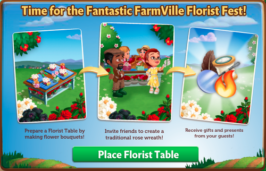
The time has come for the annual FarmVille 2 Florist Festival! Invite
Friends over to help you craft the traditional Rose Wreath for the festivities,
and receive great gifts after each crafting party!

If you are level 6 or higher, you will see the following pop-up. Click on the
green “Place Florist Table” button to place the Table frame on your farm. 


Before you can host the Florist Festival, you will need to build
your Florist Table. Your first step is collecting Building Materials. You will
need the following items to start building your Florist Table.

  • Crafting Mat
  • Florist Foam Block
  • Wood Plank

To collect Crafting Mats, click on the “Post” button to post
to your Facebook wall; you will get the parts when your friends click on it, or
when you click on a similar newsfeed post.

Click on the “Ask” button to send requests for Florist Foam
Blocks and Wood Planks to your Neighbors. If you do not wish to wait for your
friends, you can skip any of these tasks for Farm Bucks.


Florist Festival - FarmVille 2

Once you have collected the required items, click on the
“Start Building” button at the bottom of the construction Menu. 


Florist Festival - FarmVille 2

Now that your Table is almost complete, you will need some help from
your Neighbors to finish the job. The Florist Table requires 4 Builders, so
click on the “Ask Friends” button to send some crew requests to your Friends.
When they accept, you will see the spots in the Building Menu begin to fill. If
you do not wish to wait for your friends, click the “Hire One” button to
purchase crew members with Farm Bucks. Once you have successfully filled all 4
spots, click on the “Finish Building” button.


Florist Festival - FarmVille 2

 Crafting Parties

The Rose Wreath is crafted in a total of five stages. In
order to complete it, you will need to host five crafting parties with Friends.
To prepare for a crafting party, click on your Florist Table.


Florist Festival - FarmVille 2

No Florist Festival is complete without all the fixings, so it’s
time to start whipping up delicious snacks, goods and supplies for your crafting
party! From the Quest menu, click on the “Craft” button for the recipe you wish
to Craft and you will be sent to your Kitchen and/or Workshop. If you would
like a quick tutorial on how to Craft, please visit our Official Guides:
Crafting
Kitchen
and Crafting Workshop.


Florist Festival - FarmVille 2

 The Table requires 4 guests to be present before your crafting
party can begin, so click on the “Ask Friends” button to send some requests to
your Friends. When they accept, you will see the spots in the Guest Menu begin
to fill. If you do not wish to wait for your friends, click the “Hire One”
button to purchase guests with Farm Bucks. Once you have successfully filled
all 4 spots, click on the “Start Wreath Crafting Party” button to begin the
festivities!


Florist Festival - FarmVille 2

 Once your crafting party is complete, your guests will run
off and you will see the following pop-up. Click on “Share Rewards” to post a
feed to your wall that your Neighbors can click to collect rewards, too!


Florist Festival - FarmVille 2

Earning Rewards with the Florist Table

You will earn rewards each time you host a crafting party.
The more parties you host, the more rewards you will receive at the end of each
party. Below is a list of items you have a chance of earning:

  • Water
  • Power
  • Fertilizers
  • Leathers
  • Wools
  • Feathers
  • Mirrors
  • Flasks
  • Fine Sheep Fleeces
  • A completed pack of Hen House Eggs
  • A completed pack of Gourmet Yogurts


Florist Festival - FarmVille 2

The Rose Wreath part icons at the bottom of the Guest Menu indicate how
many crafting parties you have hosted. As you host parties, you will see the Rose
Wreath part icons be replaced by green check marks. You can host up to a total
of 5 crafting parties per Table and once you have finished your final crafting
party, you will earn a special reward!


Florist Festival - FarmVille 2

Additional Information:

  • You
    can have up to three Florist Tables on your farm (including frames).
  • If
    you delete the first Florist Table, you will only be able to have a
    total of two. The second and third Florist Tables can be deleted or stored in
    your Inventory.
  • Once
    the Florist Table Frames are placed on your Farm, you have 21 days to finish them and host your crafting parties.
  • Once
    you have hosted your crafting parties, you will be unable to use and/or sell
    any of the goods.
  • Once
    you have finished hosting all of your crafting parties, the Tables are yours to
    keep as decorations!

Do you prefer big crafting groups? Play around with the
arrangement of your Florist Tables to host even bigger crafting parties!

Learn How to Make Decorations with Roses!

4 February 2013 FarmMaster 0
FarmVille 2: Learn how to make decorations with roses for your farm to decorate it with the letters. 

As we discusses yesterday a new Florist Table  has arrive and now your friends will send you gifts via florist table like Feast Table on thanksgiving.
Below, we are sharing all details about the gaming FarmVille 2 missions to learn how to decorate with roses.

Late hatching

  1. Place 1 florist table in your farm to Help Walter
  2. Performed 5 actions on the farm of Walter to see what their problems
  3. Harvest 15 plots of Blueberry  to show the correct method to Walter

Flowers language

  1. Recovers 5 pairs of scissors to pick flowers for beautiful specimens
  2. Harvest 20 plots of dark thoughts to see if they like Barbara
  3. Prepare 3 dark bunches 

Orange, O despair

  1. Harvest 3 orange to begin
  2. Take care of 5 adult goats for milk because it takes with cupcakes
  3. Prepare 2 orange cupcakes for Barbara

Fresh attraction

  1. Recovers 5 baskets of flowers for an aesthetic effect
  2. Harvest 3 lemons for lemon acid
  3. Prepare 4 pitchers of lemonade for tourists visiting

A small glass

  1. Ends the florist table in your farm
  2. Harvest 20 plots of strawberries to give this lemonade punch
  3. Prepare 5 strawberry lemonades for Barbara

Color, that’s life

  1. Harvest 15 plots of blueberry to win a special award
  2. Take care of 4 adult rabbits
  3. Factory 4 blue handkerchiefs for Walter

Sign of affection

  1. Recovers 5 card holder to offer a bouquet Barbara
  2. Interviews 2 times the shack chickens for eggs
  3. Harvest 20 sunflowers to make a bouquet

A perfect union

  1. Take care of 5 adult goats for milk
  2. Look after winning 8 hens
  3. Prepare 3 tarts with goat cheese for Walter and Barbara

New Sweetheart Tree!

30 January 2013 FarmMaster 0

Hey Farmers!

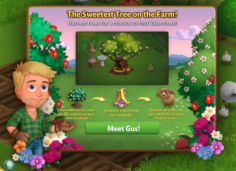
Meet Gus, the handsome new farmer in town! He has a secret
crush and needs your help collecting Valentines for the Sweetheart Tree. Craft
Valentines or Harvest
your trees for a chance to find them, which you can redeem for all kinds of romantic
prizes, including the Caramel Pygora
Goat
!

If
you are level 6 or higher, you will see the following pop-up. Click on the
green “Meet Gus!” button to get started.

Building the Sweetheart Tree

Your first step is collecting construction parts. You will
need the following items to start building your Sweetheart Tree:

  • Shovel
  • Bag of Soil
  • Wood Plank

Click on the “Ask” button to send requests for Shovels and
Wood Planks to your Neighbors. If you do not wish to wait for your friends, you
can skip any of these tasks for Farm Bucks.

To collect Bags of Soil, click on the “Post” button to post
to your Facebook wall; you will get the parts when your friends click on it, or
when you click on a similar newsfeed post.

Sweetheart Tree - Build

Note: You can send a request for materials to
your Friends every 18 hours.

Once you have collected the required items, click on the
“Start Building!” button at the bottom of the construction Menu.

Sweetheart Tree - FarmVille 2

Now that the Sweetheart Tree is almost complete, you will
need help from your Neighbors to finish the job. The
Sweetheart Tree requires 4 additional builders, so click on the “Ask Friends”
button to send some crew requests to your Friends. When they accept, you will
see the spots in the Build Menu begin to fill. If you do not wish to wait for
your friends, click the “Hire One” button to purchase crew members with Farm
Bucks. Once you have successfully filled all 4 spots, click on the “Finish
& Share” button.

Sweetheart Tree - FarmVille 2

Using the Sweetheart Tree


Click on the Sweetheart Tree to
open the main menu.

Sweetheart Tree - FarmVille 2

This
menu shows how many Valentines you have collected and what prizes you are
currently eligible to redeem.

A – The total amount of Valentines you have. As you redeem prizes, this number
decreases.
B – The button to use when you want to redeem a prize. Once you have enough Valentines,
this button will turn turquoise.

C
– The buttons to use when you want to collect Valentines crafting Ingredients
from Friends.
D – The number of Farm Bucks required to purchase Valentines.

Collecting
Valentines

Harvesting Trees: You can find Valentines by harvesting your Trees. If you
find some, they will appear in a similar fashion to prized crops.

Sweetheart Tree - FarmVille 2

When
a Valentine appears on your farm after harvesting, click on it and you will see
the following pop-up:

Sweetheart Tree - FarmVille 2

Click
on the turquoise “Share Valentines” button to post a feed to your wall. Your
friends will be able click on this feed to claim some free Valentines for themselves
too. Once you have clicked on the Valentine, it will automatically be added to your
Sweetheart tree.

If you are not finding as many Valentines as you would like by
Harvesting, it’s time to enlist the help of your Neighbors: Valentines can also
be received from friends via feed posts and the Free Gifts page.

Crafting: You
can craft your very own Valentines via the Crafting Workshop.

Click on the “Ask” button to send requests for Confectioner’s
Sugar to your Neighbors. If you do not wish to wait for your friends, you can
skip any of these tasks for Farm Bucks.

To collect Cocoa Nibs, click on the “Post” button to post to
your Facebook wall – you will get the parts when your friends click on it, or
when you click on a similar newsfeed post.

Sweetheart Tree - FarmVille 2

Individual
Valentines can also be purchased with Farm Bucks from the Sweetheart Tree
menu.

Redeeming Valentines for Prizes

Once you have collected enough Valentines, they can be redeemed for some
fantastic prizes. Click on your Sweetheart Tree to open up your progress
menu.

At the bottom of this menu, there are a total of 4 prizes that can be
redeemed for Valentines:

  • Pink
    Planter (15 Valentines)
  • Bird
    Bath (30 Valentines)
  • Camellia
    Tree (60 Fireworks)
  • Love
    Picnic Tent (145 Fireworks)

All
4 of these prizes can be redeemed as many times as you like, as long as you
have enough Valentines (250 Valentines
total
). Once you have collected all 4 of the above prizes, you will earn
the adorable Caramel Pygora Goat!

Note: You will need to redeem each of the above items at least
once before you get credit towards the Caramel Pygora Goat.

Sweetheart Tree - FarmVille 2

Once
you have redeemed each of the four prizes, Click on the “Get it” button to
claim your cute new friend!

Note: The Caramel Pygora Goat can only be redeemed for Valentines
once. If you wish to get additional Caramel Pygora Goats you will have to
purchase them with Farm Bucks via the Sweetheart Tree.

Sweetheart Tree - FarmVille 2

If you
don’t feel like collecting Valentines, all of the above prizes can also be
purchased in unlimited quantities for Farm Bucks.

Additional Information:

  • If you do not wish to use the Sweetheart
    Tree feature, it can be deleted or stored in your Inventory.
  • You can only get Valentines when
    harvesting trees on your own farm. You will not get Valentines from
    Neighbor visits.
  • You have 10 days to collect the Valentines prizes. If you do not
    collect them all, the prizes will disappear and you will be unable to claim
    them.
  • If you want to see how much time you have left to claim the Valentines
    prizes, hover your cursor over the tree.
  • You are limited to one Sweetheart Tree per farm.
No Image

Exclusive Look: The making of the “Furry-Moo”

30 January 2013 FarmMaster 0

Have
you ever wondered what goes on behind the scenes in order to bring an
animal to life in FarmVille 2? If so, we’ve got an exclusive sneak peek
you’re not going to want to miss. 

Developing
a feature in FarmVille 2 requires a ton of research, planning and
collaboration from numerous departments within the studio. This week, we
had the opportunity to sit down with Jerry, FarmVille 2’s Senior
Concept artist, to discuss the creative process behind the Highland Cow and the Yogurt Creamery. 

Jerry explains below how the FarmVille 2 Art Team took the Yogurt Creamery from an idea to a stunning new addition to the game. 

Highland Cow

“For
the Highland Cow animal, we wanted to capture the heavy coat and
attitude we noticed in our reference images. Native to Scotland, this
slow-moving, laid back cow had a lot of hair, but not a care in the
world. A shaggy haircut channeling the 90’s Seattle grunge scene and
overlapped chunks of fur brought us to our adult cow design in-game.
When addressing the baby version, giving her a haircut and keeping a
chunky look was the goal. Since the Highland Cow was a reward animal for
the Yogurt Creamery, there was a definite need to give the players
something special for all of their hard work.”


Highland Cow - FarmVille 2

A detailed sketch of the Highland Cow, before production. 


Baby Highland Cow concept art. 


Highland Cow - FarmVille 2Concept art for the Adult Highland Cow. 

Yogurt Creamery

“The Yogurt Creamery, which was originally called the “Dairy Station”,
was set up to be a big new feature for dairy animals in FarmVille 2.

Looking
at barns in New England and older rustic stone and
wood structures, we wanted to create something that felt inviting and
harkened back to farms from an earlier time. Above all else, we wanted
it to be easy on the eyes and be fun to interact with.

Starting off with
some rough ideas, we explored what might work best for this feature. A
big goal was to make the building’s gameplay elements make visual sense on the
board. Once the milk drops fly into the vat and activate the building, the belt
and wooden mixer barrel start up and start creating the yogurt mix.

While the
building is in progress, the avatar can even come by and test out the batch.
Keeping in line with the Hen House harvest state, we wanted the finished yogurt
crate to pop out of the doors and be highly visible with the yellow visual effects glow.
It was great to see this go from a rough sketch phase all the way to our
talented modeling and animation teams, and finally, into the game for everyone
to play!”


Yogurt Creamery - FarmVille 2

This
image illustrates the various build states of the Yogurt Creamery with
notes from the artist about how they invisioned the feature animating in
game. 


Yogurt Creamery - FarmVille 2

Pictured above are rough sketches of what the Yogurt Creamery was ideated as early in the development process.


Yogurt Creamery - FarmVille 2

The image above is a “storyboard” of the Yogurt Creamery, explaning the various animations and interactions of the feature. 

We
hope you enjoyed this look into the FarmVille 2 Studio, and our
favorite Furry-Moo. Please stay tuned for more exclusive FarmVille 2
showcases!

In the Kitchen with FarmVille 2: Cupcakes Galore

25 January 2013 FarmMaster 0

Earlier this week, the FarmVille 2 team induldged ourselves in scrumptious homebaked cupcakes.

One
of our talented team members, Marranda, was so inspired by our “Orange
Cupcake” Recipe from the game that she decided to bring them to life in
her own kitchen. The end results were both tasty
and beautiful – Green Tea Cupcakes with Apricot Hibiscus frosting! (see below for recipe)

A little bit about Marranda:

When
Marranda’s not carefully evaluating each and every Animal in FarmVille
2, she’s perfecting her baking skills at home. Luckily, we get to try
all of her tasty creations, just like the yummy treats pictured below. 


Green Tea Cupcakes - FarmVille 2

                      FarmVille 2 Studio, California. Personal photograph by Ron. 22 Jan. 2013.

When asked, Marranda was very excited to share her Green Tea Cup(cake) recipe with all of you to enjoy at home. Even
though we don’t get 10XP from her treats like the Orange Cupcakes give
from crafting, we sure feel awesome after eating one. Or two. But hey,
who’s counting anyways?

Green Tea (Cup) Cake

  • 1 cup all-purpose flour
  • 1 cup cake flour
  • 1 tsp. baking soda
  • 1 tsp. salt
  • 4 tsp. powdered green tea
  • 1 ¼ cup baker’s sugar
  • 1 cup vegetable oil
  • 3 eggs
  • 1 cup plain yogurt
  • 1 ½ tsp. vanilla extract


Directions

  1. Preheat
    oven to 350 degrees F (175 degrees C). Grease and flour 2 – 9 inch
    round pans. Sift together the all-purpose flour, cake flour, baking
    soda, salt, and green tea powder; set aside.
  2. In
    a large bowl, beat together sugar, oil, and eggs until smooth. Stir in 1
    1/2 teaspoons vanilla. Beat in the flour mixture alternately with the
    yogurt, mixing just until incorporated. Pour batter into prepared pans.
  3. Bake
    in the preheated oven for 30 to 40 minutes, or until a toothpick
    inserted into the center of the cake comes out clean. Cool on wire rack
    for 30 minutes before turning out of the pans.
  4. To
    make Green Tea Frosting: Sift together confectioners’ sugar and green
    tea powder. In a medium bowl, combine tea mixture with butter, cream
    cheese, vanilla and milk. Beat with an electric mixer until smooth.
  5. To
    assemble the cakes: when the cakes are completely cooled, put one layer
    on a flat serving plate. Spread a thin layer of frosting over it. Place
    the other layer of cake on top, and spread frosting to cover the top
    and sides of cake. Dust with green tea powder if desired. Serve cold or
    at room temperature.


Whipped Cream Frosting

  • 1 cup (240 ml) cold heavy whipping cream
  • 1/2 teaspoon pure vanilla extract
  • 1-2 tablespoons (15-25 grams) granulated white sugar, or to taste
  • 1/3 cup of any fruit preserve


Directions


Place your mixing bowl and wire whisk in the freezer for about
15-30 minutes. Then place all the ingredients in the cold bowl and beat
just until stiff peaks form. If not using immediately, cover and refrigerate. Makes about 2 cups (480 ml) whipped cream.

Viola!

“New Goat Shelter” Quest Guide

23 January 2013 FarmMaster 0

Hey Farmers!
The Goat Shelter has arrived in FarmVille 2!
Use
this new building to store up to 12 Prized Goats and feed them all with
a single click! If that wasn’t enough, Prized Goats in the Shelter will
only require half the Feed and you also gain an additional +35 Feed
Capacity!
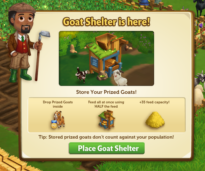
If you are level 6 or higher, you will see the following pop-up. Click on “Place Goat Shelter” to get started.
 
Building the Goat Shelter

Your first step is collecting construction parts. You will need the following items to start building your Goat Shelter 

  • Goat Bedding
  • Hinge
  • Nails
To
collect Goat Bedding, click on the “Post” button to post to your
Facebook wall – you will get the parts when your friends click on it, or
when you click on a similar newsfeed post.
Click
on the “Ask” button to send requests for Hinges and Nails to your
Neighbors. If you do not wish to wait for your friends, you can skip any
of these tasks for Farm Bucks.
Goat Shelter - Build Materials - FarmVille 2
Note: You can send a request for materials to your Friends every 18 hours.

Once you have collected the required items, click on the “Start Building!” button at the bottom of the construction Menu. 

Goat Shelter - Start Build - FarmVille 2
Now
that the Goat Shelter is almost complete, you will need some help from
your Neighbors to finish the job. The Goat Shelter requires 4 mechanics,
so click on the “Ask Friends” button to send crew requests to your
Friends. When they accept, you will see the spots in the Build Menu
begin to fill. If you do not wish to wait for your friends, click the
“Hire One” button to purchase crew members with Farm Bucks. Once you
have successfully filled all 4 spots, click on the “Finish & Share”
button.
 Goat Shelter - Finish Build - FarmVille 2
Using the Goat ShelterClick on the Goat Shelter to open the main menu. 
 Goat Shelter - Main Menu - FarmVille 2
Inside the Goat Shelter you will see twelve placements that you can fill with Prized Goats (twelve Goats total). Prized Goats will take up one spot in your Shelter regardless of breed (see below: Red Goat).
Goat Shelter - Red Goat - FarmVille 2
Note: Rotate the Shelter to view a different angle!
 Goat Shelter - Options - FarmVille 2
Adding & Removing Goats:
To
add Prized Goats in the Shelter, check the “Auto Fill” box and click on
the green “Add Prized Goats” button. All your Prized Goats will
automatically jump into the Shelter!
To
remove a Prized Goat from the Shelter, open the main menu and click on
the red “–“ (minus symbol) box on the bottom left hand corner of the
placement slot (see below: A).
The Goat cards have symbols on them to indicate different things:
Goat Shelter - Icons - FarmVille 2


A. Minus Symbol: Remove Goat
B. Feed: How much Feed the Goat will consume
C. Goat Cheese: How many Goat Cheese the Goat will produce (see below: Feeding).
Feeding:
Each
Prized Goat stored in the Shelter will eat half of the amount of Feed.
For example, a Goat that eats 8 Feed will eat 4 Feed when inside the
Shelter. Note: Any Prized Goat that would normally eat an odd amount of
feed outside of the Goat Shelter will be rounded up by one. For example,
a Goat that would eat 9 Feed – when stored in the Goat Shelter will
only need 5 Feed.
In addition, each Prized Goat will produce Goat Cheese when fed, so look out for them after feeding!
Additional Information:
  • Once your Goat Shelter is completed, you now have +35 Feed Capacity!
  • The timer for your Goat Shelter will pause when placed in Storage, and then resume once placed back on your farm.
  • If you do not wish to use the Goat Shelter feature, it can be sold (frame only) or stored in your Inventory.
  • If you want to see how much time you have left to harvest, hover your cursor over the Shelter.
  • You are limited to one Goat Shelter per farm.

Chinese New Year Crafting Recipes: Everything you need to know!

22 January 2013 FarmMaster 0


We’ve already brought you a complete look at the new Chinese New Year decorations, crops, animals, and trees in the FarmVille 2 marketplace, but that’s not the only presence of Chinese New Year items in the game. There are also three new Crafting Kitchen recipes that will be available for crafting for around a month, and we’re here with a complete guide to their ingredients and payouts. Let’s get started!

The first recipe is Goji Berry Lemonade, and it can be crafted with one Lemonade and eight Goji Berries. These berries can be planted for 28 coins per square, and they’re ready to harvest after four hours. As for the Lemonade, this recipe itself is worth 350 coins, and it takes a couple of steps to create. First, you’ll need to combine Lemons and Water to make Lemon Water, and after that, you’ll combine the Lemon Water with more Lemons to create the actual Lemonade. That makes this recipe even more valuable than its 350 coin sale price, since it requires Water, arguably the most valuable item in the game. If you decide to turn your Goji Berries into Goji Berry Lemonade, you’ll be able to sell a single batch for 2,510 coins. You’ll also receive 16 XP for each Lemonade you create.The second recipe is for a jar of Salted Plums, which requires three Salt and 10 Chinese Plums to create. The Salt can be earned by sending out individual requests to your friends for help, while the Chinese Plums are earned from the Chinese Plum Tree. A single Chinese Plum Tree is available for purchase for 12 Farm Bucks, but if you’re not willing to spend Farm Bucks on the tree to earn Chinese Plums on your own farm, you might be able to earn some from friends. That is, you can tend these trees on your friends’ farms (where available) to have a chance at Chinese Plums, but there’s no guarantee you’ll actually earn enough to be able to create some Salted Plums. If you do, or you simply purchase the tree yourself, you can sell a single jar of Salted Plums for 3,000 coins. You’ll receive 16 XP for each one you create.The final recipe is another premium option, as Orange Fortune Cookies are available to create using three Batter and eight Mandarin Oranges each. The Batter can be created using Flour and Eggs, with Flour being created using Wheat. The Mandarin Oranges, meanwhile, are earned via the Mandarin Orange Tree which can be purchased for 12 Farm Bucks. If you gather enough Mandarin Oranges to create an Orange Fortune Cookie, either through your own trees or through friends’, you’ll be able to sell them for 3,340 coins per batch. This recipe rewards 24 XP per creation.These recipes will be available for 27 days, while the actual trees and crops in this theme will expire after 20 days. We’ll make sure to let you know if this Chinese New Year theme expands in FarmVille 2 before the actual event comes and goes next month, so stay tuned!

Play FarmVille 2 on Zynga.com now >