Starting Out With Expansions:
When you first start the game, the land you can farm on is a little small. Marie will walk you through expanding to your first plot, revealing a feed mill and a lemon tree:
Which Plots Can I Unlock?
You will eventually be able to expand your farm to all the grassy areas and the river you see on your screen. As you reach higher levels in the game, these plots will become available for you to unlock. You can hover your mouse over a plot to see which level you need to be on to unlock that plot, as well as which goodies you will unlock when you expand to that plot:
Expanding Your Farm:
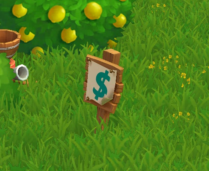
You can tell if a plot is available to expand on because you will see a sign pop up in the plot that looks like this:
When you click on a plot to expand it, you will see a pop-up. In this pop-up, you will see a list of requirements you need to meet before you are able to unlock a plot, like this:
When you are ready to unlock a plot of land, you need to have all of these requirements in your Inventory. For example, in the case above, if you have four eggs in your inventory but sell one to get more Coins so you can have the 1,000 Coins you need to unlock the land, you will no longer have enough eggs.
Once you have met all the requirements, the “Expand” button will turn blue and you can click on it to call in Marie’s “landscaping service” to clear the land for you:
Clearing land does more than just gives you more space to farm in—it also unlocks cool new items and game mechanics! You already saw this in action the first time you expanded; when you unlocked the land that had the Feed Mill on it, you were able to use the Mill to feed your goats. Every time you expand, you will uncover some new items. Best of all, once you unlock an item via expansion, you also unlock that item in the General Store, so you can purchase more if you want to!
Clearable Objects:
When you expand, there may be items on your new land that you do not want. Rocks and Debris need to be cleared away before you can use the space they are currently occupying.
How Do I Clear Something From a New Plot?
Clearing large objects is not easy—you are going to need some help! To get started, click on the object you want to clear away. Once you do that, you will see a popup telling you what you need to do in order to clear the object:
This popup lets you know a few things:
- What you need to do to clear the object
- How many tools or people you need to help you
- What you will get once you clear the object away
Clearing requires you to complete two steps: one to gather materials you will need to tackle the job, and another to hire the crew needed to complete the task.
If you are in a hurry to clear an object and do not want to wait, you can purchase the materials you need and hire help using Farm Bucks.
Gathering Materials:
- Gather the tools you need to clear debris away by asking your friends to send some your way.
- You can do this by clicking on the “Ask” button in the pop-up window. A message will be sent from you to your friends (you can choose which friends get this message), asking your friends to send you the tools that you need.
- Don’t have time to wait? You can buy the tools you need with Farm Bucks.
Hiring a Crew:
Once you have your Materials, you will see a pop-up similar to this one:
- To complete this step, click on the “Ask Friends” button to send a request to your friends for help.
- If they accept your request, they will fill one of the open positions, and you will see their Facebook or Zynga profile picture next to one of the positions you needed to fill.
- Don’t have time to wait on a crew of volunteers? You can also purchase crewmembers for Farm Bucks.
Once you have the required number of crewmembers, the “Finish Clearing” button in the pop-up will turn blue, meaning that you are ready to go! Click on it to finish clearing the object away.
Rewards for Clearing an Object:
Remember when you first opened up the pop-up to clear the object away and you saw a part of the pop-up that looked like this?
These are the rewards you get when you clear away an object. They vary depending on what the object you are clearing away is made of (for example, clearing a rock gets you Bricks, while clearing a Piece of Wood debris gets you Wood Planks). After your crew is finished clearing an object, you will see a nice pile of rewards where the object used to be. Hover your mouse over them to scoop them up and into your Inventory, or just wait and they will be collected for you automatically.
Expansion Requirements:
For each Expansion, there are a few requirements you need to meet in order to be able to uncover the land! Most Expansions require you to reach a certain level in the game and have a certain amount of Coins and items in your Inventory in order to gain access. See the “Expansion Requirements” section below for details on each Expansion.
Expansion Requirements (Detailed):
1 & 2 – Original land you start out with in the game – comes free when you start playing FarmVille 2!
3 – The Feed Mill
- Reach Level 2
- 175 Coins to Clear Land
- Unlocks: Feed Mill and Lemon Tree
4 – The Family Well
- Reach Level 2
- Sell 8 Eggs from the Market Stand
- Harvest 16 Wheat
- 1,000 Coins to Clear Land
- Unlocks: Water Well
5 – The Farmstead Kitchen
- Reach Level 2
- Have 5 Trees
- Sell 4 Milk from the Market Stand
- 2,000 Coins to Clear Land
- Unlocks: Ability to craft Recipes in the Kitchen
6 – The West Meadow
- Reach Level 5
- Craft 2 Apple Scones from the Crafting Kitchen
- Gather 2 Garden Clippers from your friends
- 20,000 Coins to Clear Land
- Unlocks: Cottontail Rabbit
7 – Apricot Acres
- Reach Level 6
- Sell 10 Saddles from the Market Stand
- Gather 18 Garden Gloves from your friends
- 750,000 Coins to Clear Land
- Unlocks: Apricot Tree and Dinner Bell
8 – Milk Meadow
- Reach Level 11
- Expand to adjacent land
- Craft 9 Peach Lemonades from the Crafting Kitchen
- Gather 7 Iron Hoes from your friends
- 50,000 Coins to Clear Land
- Unlocks: Longhorn Cow and an additional Water Trough
9 – The Old Silo
- Reach Level 15
- Expand to adjacent land
- Craft 3 Apple Pies from the Crafting Kitchen
- Gather 10 Pitch Forks from your friends
- 125,000 Coins to Clear Land
- Unlocks: Ability to store more feed using the Silo
10 – Camarillo Country
- Reach Level 15
- Expand to adjacent Appaloosa River (see the “Appaloosa River Expansions” section below)
- Unlocks: The Appaloosa River, Camarillo Horse, and Hitching Post
11 – Mango Gardens
- Reach Level 20
- Have 1 Adult Brown Swiss Cow
- Gather 13 Chainsaws from your friends
- 300,000 Coins to Clear Land
- Unlocks: Peach Trees and Ivy Trellis Arches
12 – Golden Chicken Colony
- Reach Level 24
- Expand to adjacent land
- Craft 5 Banana Cream Pies from the Crafting Kitchen
- Gather 15 Produce Crates from your friends
- 500,000 Coins to Clear Land
- Unlocks: Cochin Chickens and Concrete Birdbath
13 – Playground Patch
- Reach Level 34
- Expand to adjacent land
- Crafting 20 Cherry Cobblers from the Crafting Kitchen
- Gather 20 Permits to Expand from your friends
- 2 Million Coins to Clear Land
- Unlocks: Tire Swing
14 – East Woodlands
- Reach Level 38
- Expand to adjacent land
- Craft 30 Squash Soup from the Crafting Kitchen
- Gather 20 Blue Toolboxes from your friends
- 3 Million Coins to Clear Land
- Unlocks: Pine Tree
15 – The Horse Wilds
- Reach Level 43
- Expand to adjacent land
- Crafting 12 Loaves of Barley Bread from the Crafting Kitchen
- Gather 20 Scythes from your friends
- 4 Million Coins to Clear Land
- Unlocks: Appaloosa Horse and Flag
16 – The Waterpatch
- Reach Level 48
- Expand to adjacent land
- Craft 15 Asparagus Quiche from the Crafting Kitchen
- Gather Expansion Blueprints from your friends
- 4 Million Coins to Clear Land
- Unlocks: Extra Well for additional Water
17 – The Hog Wilds
- Reach Level 54
- Craft 15 Walnut Pinwheels from the Crafting Kitchen
- Gather 20 Expansion Maps from your friends
- 4 Million Coins to Clear Land
- Unlocks: Baby Hampshire Pig
18 – The Date Orchard
- Reach Level 56
- Craft 20 Jelly Donuts from the Crafting Kitchen
- Gather 20 Spot Lights from your friends
- Unlocks: Date Tree and Swing Set
- 4 Million Coins to Clear Land
19 – The Old Treehouse
- Reach Level 63
- Craft 25 Walnut Stuffed Dates from the Crafting Kitchen
- Gather 20 Cameras from your friends
- Unlocks: Tree House
- 5 Million Coins to Clear Land
20 – The Old Watering Hole
- Reach Level 68
- Craft 25 Quinoa Breakfast Muffins from the Crafting Kitchen
- Gather 20 Celebration Ribbons from your friends
- Unlocks: An additional Water Trough
- 5.5 Million Coins to Clear Land
The Forest to the North Expansions:
21 – The Bird’s Nest
- Reach Level 72
- Craft Egg Rolls from the Crafting Kitchen
- Gather 20 Binoculars from your friends
- 7 Million Coins to Clear Land
- Unlocks: Baby Wild Turkey and The Bird’s Nest
22 – The Storage Shack
- Reach Level 77
- Craft Macaroni and Cheese from the Crafting Kitchen
- Gather 20 Locks from your friends
- 7 Million Coins to Clear Land
- Unlocks: The Storage Shack Silo (ability to store more feed)
23 – Maple Meadow
- Reach Level 82
- Craft Lavender-Gingerbread Short Cookies from the Crafting Kitchen
- Gather 20 Buckets from your friends
- 8 Million Coins to Clear Land
- Unlocks: Sweet Maple Tree and Stone Fountain
24 –Clearing into the Woods
- Reach Level 87
- Craft Walnut Date Bread from the Crafting Kitchen
- Gather 20 Axes from your friends
- 8 Million Coins to Clear Land
- Unlocks: Farmhouse in ”cream” tone
25 – The Old Furnace
- Reach Level 93
- Craft Raspberry Cheesecake from the Crafting Kitchen
- Gather 20 Flint Stone from your friends
- 9 Million Coins to Clear Land
- Unlocks: Chopping Block, Rocking Chair, and ability to get additional power from a rustic Furnace
The Appaloosa River Expansions:
If you are level 15 or higher and have the Camarillo Country Expansion (Expansion #15), you will unlock the first set of the Appaloosa River Expansions.
1 – Appaloosa River – Unlocks when you expand Camarillo Country and reach level 15!
2 – Buffalo Brook
- Reach Level 15
- Expand to adjacent land
- Craft 8 Cheddar Loaves from the Crafting Kitchen
- Get 18 Boater Hats from your friends
- 750,000 Coins to Clear Land
- Unlocks: Baby Black Water Buffalo
3 – The Riverside
4 – The Far Shore
Tip: Have you not quite made it to the minimum level requirement for an Expansion? Get a head start by gathering your Expansion Permits. They will come in handy once you level up!
Now that you know how to expand, the rest is up to you. Use the extra space to grow more Crops and Trees to earn Coins, build a corral for your horses, or just let the rabbits roam wild in the additional space!